A self-hosted movie recommendation agent with LightRAG and MCP
How I built a personal movie expert with LightRAG and Archestra that learns from my feedback.
2026-01-12 · Dominik Broj, Founding Engineer
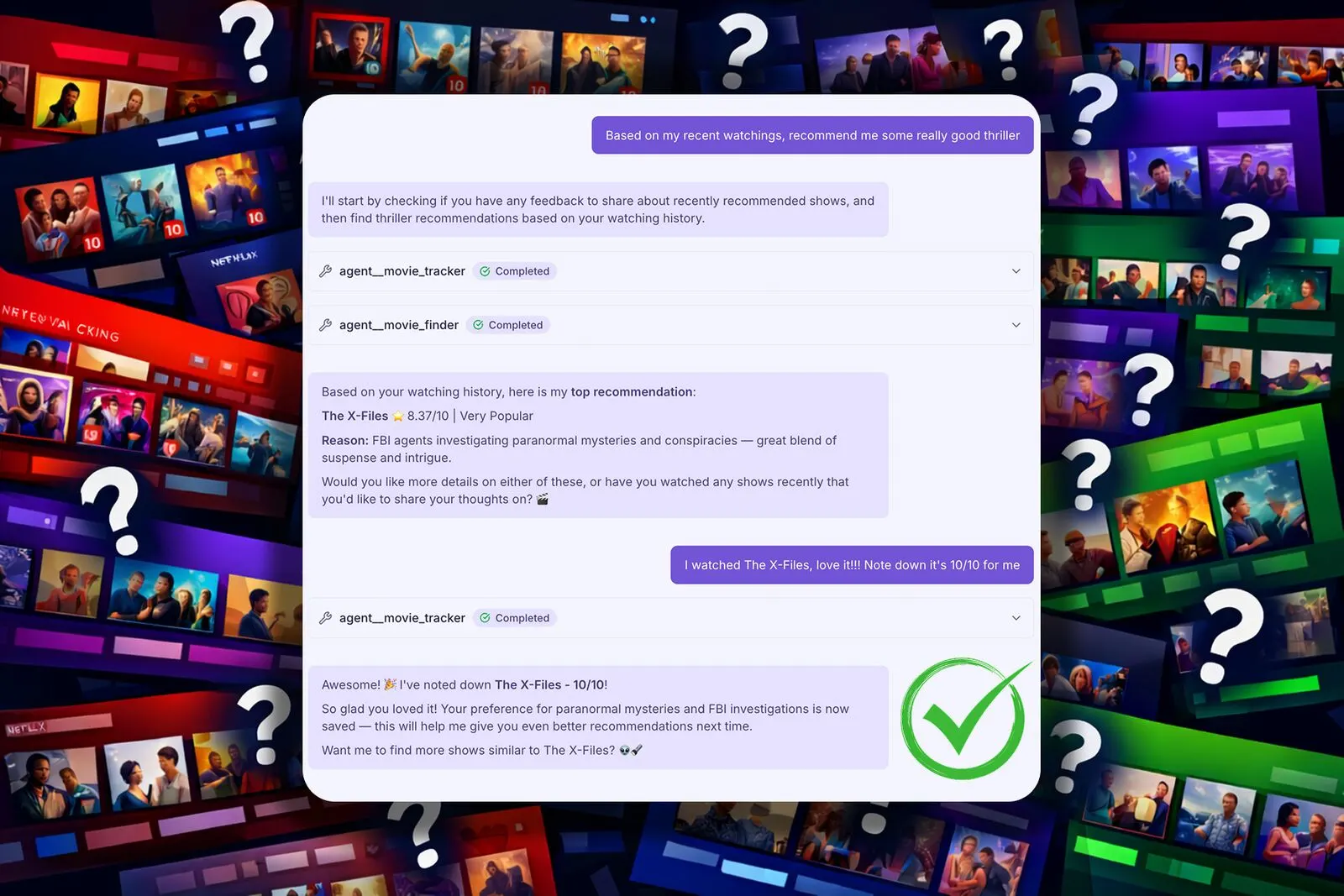
I've watched so many TV shows that finding the next one has become a mission. I keep jumping between streaming platforms looking for something I actually want to watch. Filters barely help. Finding something great but not that popular? Good luck with that 😅
What I really want is recommendations based on my preferences and what I've already watched - not just what's trending. I don't want to be locked into a specific platform either. I want a single place to search shows across all of them.
Let's fix this by building an AI agent that recommends TV shows based on your taste and current mood - a personal movie expert that actually remembers what you enjoyed.
We'll use LightRAG, Neo4j and Qdrant to create a system that learns from your feedback. Archestra will tie everything together as the orchestration layer, giving our agent the knowledge base and memory it needs.
Tech stack and architecture
LightRAG is a retrieval-augmented generation framework. We'll back it with Neo4j for graph storage and Qdrant for vector storage. Archestra connects to LightRAG via an MCP server running on the Archestra MCP Orchestrator.
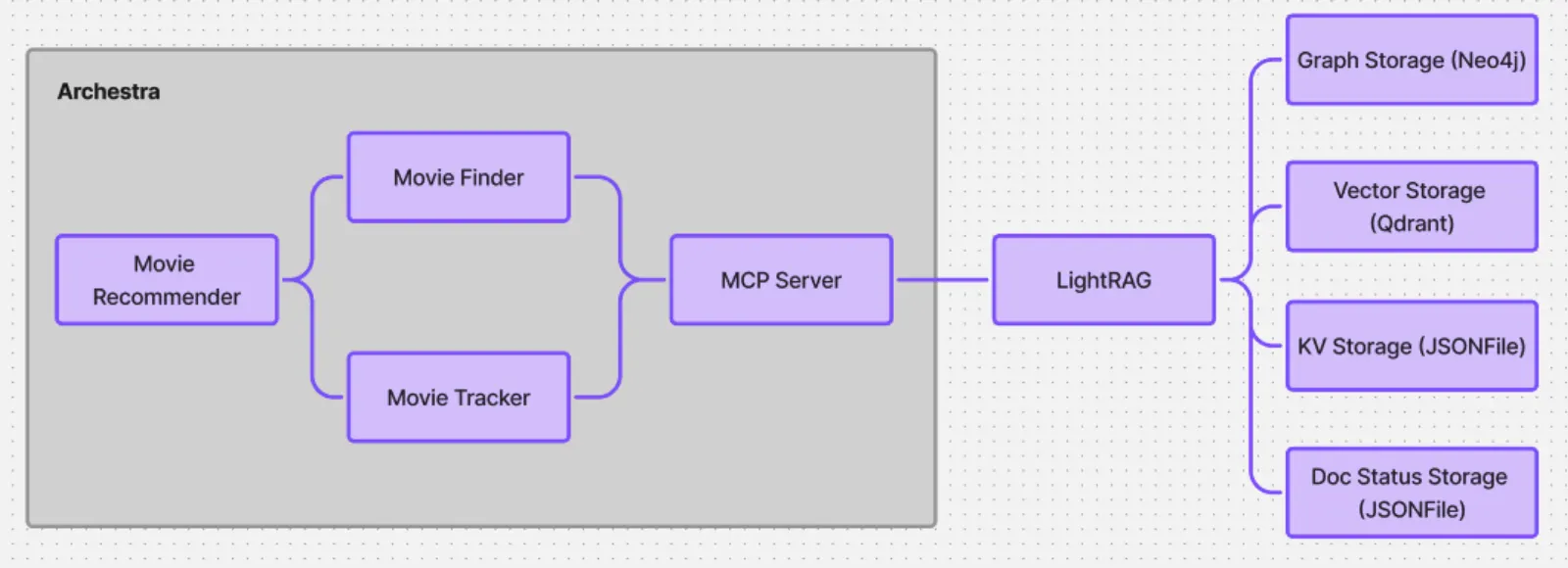
LightRAG brings them together nicely - it extracts entities and relationships into Neo4j and stores embeddings in Qdrant. This gives us dual-level retrieval: finding specific facts via the graph and broad themes via vectors. For caching and document status tracking we'll stick with the default JSONFile storage.
Our agent setup:
- Movie Recommender - the main orchestrator
- Movie Finder - sub-agent that searches for content
- Movie Tracker - sub-agent that manages watch history and feedback
For data, we'll pull TV shows from themoviedb.org.
Let's get started
Prerequisites
You'll need:
- Docker - to run Neo4j, Qdrant and LightRAG
- Node.js - to run the data scripts
- OpenAI API key - LightRAG uses this for the LLM and embeddings
- TMDB API key - to fetch TV show data (free at themoviedb.org)
Neo4j and Qdrant
Spin up both databases locally:
docker run -d --name neo4j \
  -p 7474:7474 -p 7687:7687 \
  -e NEO4J_AUTH=neo4j/your-password \
  neo4j:latest

docker run -d --name qdrant \
  -p 6333:6333 -p 6334:6334 \
  qdrant/qdrant:latest
Neo4j browser is at
http://localhost:7474, Qdrant dashboard at http://localhost:6333/dashboard.LightRAG server
Now let's start LightRAG and wire it up to both databases:
docker run -d --name lightrag \
  -p 9621:9621 \
  -e LLM_BINDING=openai \
  -e LLM_MODEL=gpt-4o-mini \
  -e EMBEDDING_BINDING=openai \
  -e EMBEDDING_MODEL=text-embedding-3-small \
  -e OPENAI_API_KEY=sk-your-openai-key \
  -e LIGHTRAG_GRAPH_STORAGE=Neo4JStorage \
  -e LIGHTRAG_VECTOR_STORAGE=QdrantVectorDBStorage \
  -e NEO4J_URI=bolt://host.docker.internal:7687 \
  -e NEO4J_USERNAME=neo4j \
  -e NEO4J_PASSWORD=your-password \
  -e QDRANT_URL=http://host.docker.internal:6333 \
  --add-host=host.docker.internal:host-gateway \
  ghcr.io/hkuds/lightrag:latest
The
host.docker.internal trick lets the LightRAG container reach Neo4j and Qdrant on your host machine.Once running, the LightRAG UI is at
http://localhost:9621.Fetch TMDB data
This script grabs classic English TV shows from TMDB - released before 2010 (just my caprice), rated 7+ with at least 200 votes. Feel free to tweak these filters. Download it and run:
TMDB_API_KEY=your-key node fetch-tmdb-tv-shows.mjs
You'll get a
tmdb_tv_shows.json file with ~100 TV shows.Ingest data into LightRAG
Time to feed this data to LightRAG. During ingestion it extracts entities and relationships, creates vector embeddings and builds a knowledge graph connecting shows, genres and metadata.
This script reads the JSON and sends each show to the LightRAG API. Download and run:
node ingest-tv-shows.mjs

All 100 TV shows will be ingested. Check out the knowledge graph in the UI - pretty cool!
Connect with Archestra
Let's get Archestra running. The quickstart mode spins up everything including an embedded Kubernetes cluster for MCP server orchestration:
docker run -p 9000:9000 -p 3000:3000 \
  -e ARCHESTRA_QUICKSTART=true \
  -v /var/run/docker.sock:/var/run/docker.sock \
  -v archestra-postgres-data:/var/lib/postgresql/data \
  -v archestra-app-data:/app/data \
  archestra/platform
Once it's up, head to
http://localhost:3000.Important: Archestra's MCP servers run inside a KinD cluster on a separate Docker network. To let them reach LightRAG, connect the container to that network:
docker network connect kind lightrag
Now LightRAG is accessible from MCP servers at
http://lightrag:9621.We'll use an MCP server via the Archestra MCP Orchestrator - specifically my fork of lightrag-mcp which adds HTTPS support.


Add MCP server to registry
First, add the MCP server to the registry:
Install MCP server and assign tools
Install the MCP server with the credentials for LightRAG. Under the hood, Archestra's MCP Orchestrator spins up a pod and discovers the available tools.
Then assign the tools to a profile so they're available in chat. We'll also loosen the tool policies since we trust our data.
Create agents

Time to create our agents! Recommender orchestrates everything. Finder searches for TV show candidates. Tracker collects feedback about what you've watched and enriches the knowledge graph.
Here's the key insight: when Tracker inserts your feedback into LightRAG, it gets processed like any other document. LightRAG extracts entities and relationships and links them to existing nodes in the graph. So if you say "I loved Breaking Bad, especially the character development, 9/10", LightRAG connects that sentiment to the Breaking Bad entity. Future queries about "shows with great character development" will factor in your preferences.
Here are the system prompts:
Movie Recommender (Orchestrator)
You are a friendly movie recommendation assistant. At the start of each conversation, first delegate to Movie Tracker to check if the user has shared feelings about recently recommended shows - if not, ask the user to share their impressions before proceeding. When the user wants recommendations, delegate to Movie Finder. Answer should be simple and short - "I recommend: <title>, <rating>, <popularity>. Reason: <short_explanation>. Recommend maximum 2 TV shows.
Movie Finder (Sub-agent)
You find TV show recommendations by querying LightRAG. Use the query tool to search for shows matching user preferences, mood and viewing history. Return relevant recommendations with brief explanations of why each show might appeal to the user but be concise and concrete.
Movie Tracker (Sub-agent)
You track the user's TV show watching history and ratings. When asked to check for feedback, query LightRAG for recent user activity and identify shows that were discussed but lack ratings. When collecting feedback, ask the user about their impressions and ratings (1-10), then use the LightRAG insert tool to add this feedback as a new entry. LightRAG will extract entities from the feedback and link them to existing shows in the knowledge graph, enriching future recommendations.
The result 🎉
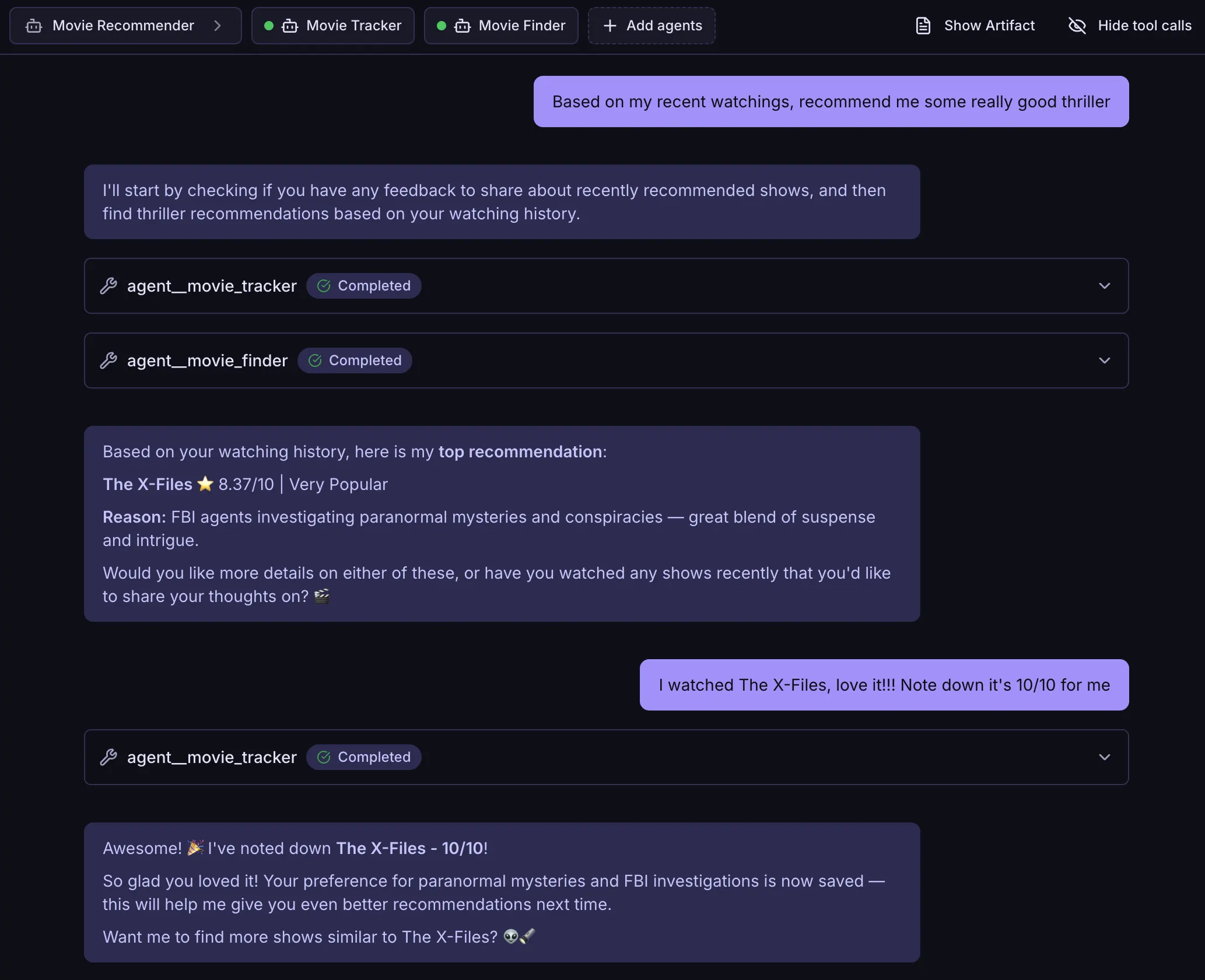
Let's test it! Start a chat with Movie Recommender. When you share feelings about a show, Movie Tracker asks follow-up questions if needed and inserts your feedback into LightRAG. The system extracts entities and connects them to existing shows in the graph.
In future sessions, this enriched graph is available. When you ask for recommendations, Movie Finder queries LightRAG with your preferences baked in. The knowledge graph grows with every piece of feedback you provide.
Exactly what I wanted!
Now I can finally focus on watching TV shows instead of spending time finding the right ones 😌🍿