# Agents
> Build agents with instructions, tools, skills, subagents, and triggers
An agent is a reusable assistant: instructions, a model, and the tools, knowledge, skills, and subagents it can use. You build it once and use it everywhere: in Chat, from your coding agent, in messaging channels, and from other systems.
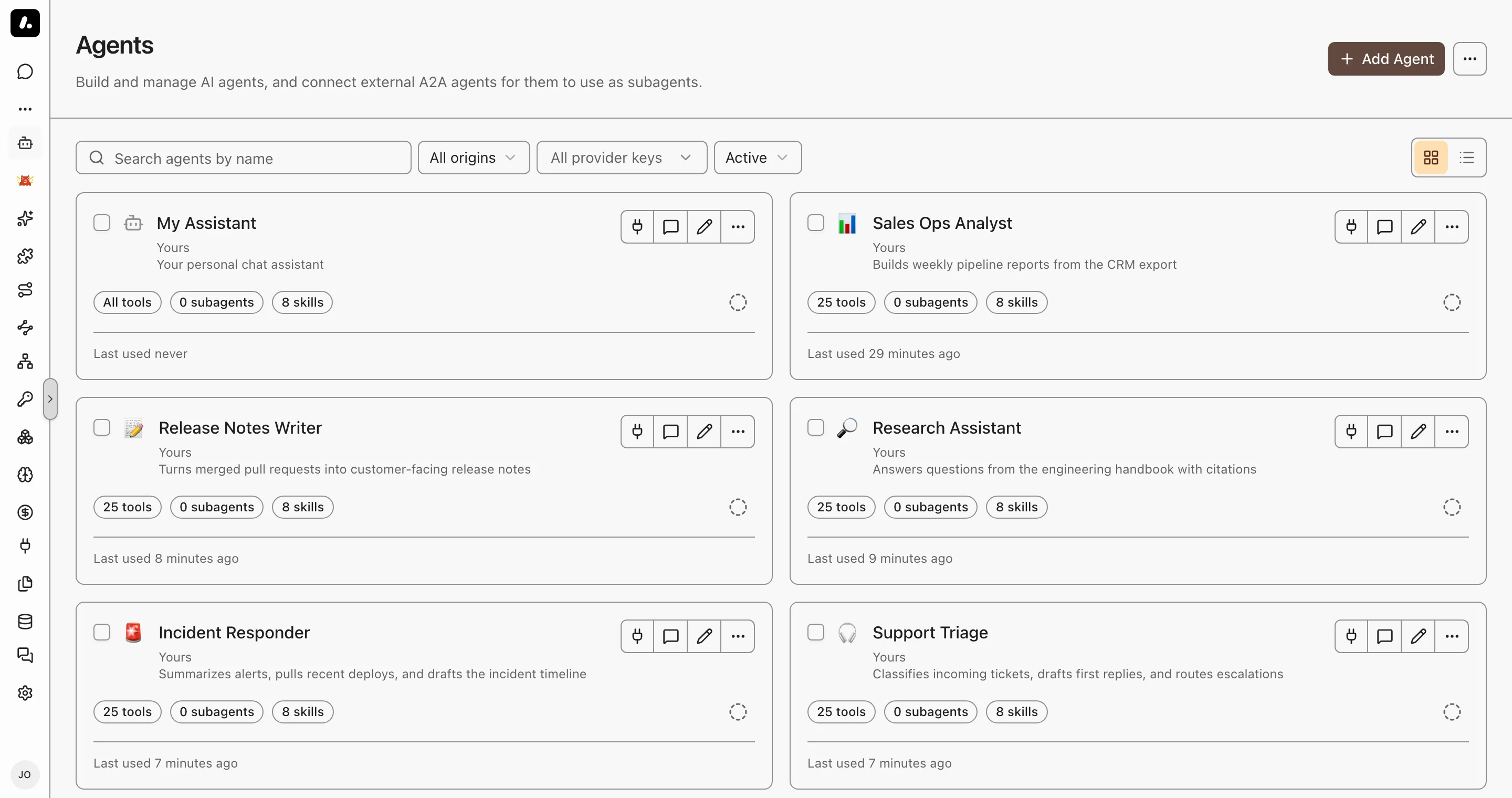
## Create an Agent
1. Go to **Agents** and click **Add Agent**.
2. Start from scratch, or pick a template under **Agent Runtimes**.
3. On **Configuration**, enter a name and instructions, and choose the model.
4. Click **Continue setup** to choose tools, knowledge, skills, subagents, and messaging channels.
5. Click **Create**, then **Chat** to send your first task.
What to know:
- Instructions can use your details, such as your name, teams, and today's date. See [Prompt Templates](#prompt-templates).
- To run the agent in its own container, with a live terminal, give it a [dedicated runtime](https://archestra.ai/docs/agents/runtime).
## Choose What the Agent Can Use
On the **Tools, Skills & Knowledge** tab, each kind of resource has two modes:
- **All:** the agent can use everything the person using it can access, in the agent's [environment](https://archestra.ai/docs/admin/environments). You can exclude items under **All … except**.
- **Manual:** the agent uses only what you assign.
This works the same for tools, knowledge sources, [skills](https://archestra.ai/docs/agents/skills), and [subagents](https://archestra.ai/docs/agents/subagents).
What to know:
- Each person uses their own access, so two people can get different tools from one agent. In **Manual** mode, a person gets an assigned tool only if they can access its MCP server. In both modes, a tool that needs an account uses the person's own connection, unless you pin one.
- Built-in platform tools are excluded by default in All mode. Review the exclusions before you give an agent tools that change Archestra itself.
- The agent loads tools as it needs them. It starts with [`search_tools`](https://archestra.ai/docs/reference/archestra-mcp-server#search_tools) and [`run_tool`](https://archestra.ai/docs/reference/archestra-mcp-server#run_tool), not the full list. In **Manual** mode, you can turn off **Progressive tool loading** to send every assigned tool.
- **Missing connections:** in **Manual** mode, choose when the agent prompts users to connect missing tool accounts (on call, on chat open, or required before chat). To use one account for everyone, pin a connection or [resolve credentials at call time](https://archestra.ai/docs/mcp/authentication/servers#resolve-at-call-time).
## Use an Agent
Run an agent interactively, delegate work to it from your coding client, or trigger it from team channels and APIs:
- **Chat and Projects:** select the agent from the picker in [Chat](https://archestra.ai/docs/chat) or scope it to a [Project](https://archestra.ai/docs/chat/projects).
- **Coding agents:** once [connected](https://archestra.ai/docs/get-started/connect), hand off background tasks from your editor or CLI with [`start_agent_run`](https://archestra.ai/docs/reference/archestra-mcp-server#start_agent_run) and monitor their progress. See [Hand Off Work](https://archestra.ai/docs/agents/runtime/handoff).
- **Messaging channels:** connect [Slack](https://archestra.ai/docs/agents/triggers-and-channels/slack), [Microsoft Teams](https://archestra.ai/docs/agents/triggers-and-channels/ms-teams), [Telegram](https://archestra.ai/docs/agents/triggers-and-channels/telegram), or [Email](https://archestra.ai/docs/agents/triggers-and-channels/email) on the agent's **Messaging Channels** tab. See [Triggers & Channels](https://archestra.ai/docs/agents/triggers-and-channels).
- **Automations and APIs:** invoke the agent programmatically via [Agent-to-Agent (A2A) calls or incoming webhooks](https://archestra.ai/docs/agents/triggers-and-channels/webhook-a2a).
What to know:
- **Default agent:** new chats automatically use your default agent. To change it, click **Set as default** on any agent card under **Agents**.
- **Sidebar pinning:** click **Pin** on an agent to keep it in the left navigation sidebar for quick access.
## Prompt Templates
Tailor an agent's instructions to the person using it. Write [Handlebars](https://handlebarsjs.com/) expressions in the **Instructions** field, on the agent's **General** tab. Archestra fills them in on each run:
```handlebars
You help {{user.name}}. Today is {{currentDate}}.
{{#includes user.teams "Engineering"}}You can use the engineering tools.{{/includes}}
```
| Expression | Gives |
| --- | --- |
| `{{user.name}}`, `{{user.email}}` | The person's name and email |
| `{{user.role}}` | Their organization role |
| `{{user.teams}}` | Their team names, as a list |
| `{{currentDate}}`, `{{currentTime}}` | The date and time in UTC, such as `2026-03-12` and `14:30:00 UTC` |
| `{{archestraVersion}}` | The version of the running platform, such as `1.4.0` |
What to know:
- **Helpers:** Handlebars [blocks](https://handlebarsjs.com/guide/builtin-helpers.html) such as `#if` and `#each` work, and so do `includes`, `equals`, `contains`, and `json`.
- [Skills](https://archestra.ai/docs/agents/skills) can use templates too. Add `templated: true` to the skill's frontmatter. See [Writing Skills](https://archestra.ai/docs/agents/skills/writing).
- To keep an expression as text, add a backslash: `\{{user.name}}`. An expression Handlebars cannot read stays as written.
## Code Sandbox
Each conversation gets a private Linux container, so the agent can run shell commands and Python with [`run_command`](https://archestra.ai/docs/reference/archestra-mcp-server#run_command).
- **Files you attach** appear under `/home/sandbox/attachments/`.
- **Large tool results** go to `/home/sandbox/tool-results/`. When a tool returns more than 32 KB of text, the agent sees only the beginning, plus the file's path to grep the rest.
- **Files the agent saves** appear in the conversation's **Files** panel.
- **Network access** follows the [egress policy](https://archestra.ai/docs/admin/environments#network-egress-policies) of the agent's environment, unless the agent [sets its own](https://archestra.ai/docs/admin/environments#give-one-agent-its-own-policy).
What to know:
- Files stay between commands. Running processes do not.
- Without the sandbox, or in an encrypted chat, a large tool result is cut to its first 32 KB.
- The sandbox is on by default. To turn it off, set [`ARCHESTRA_CODE_RUNTIME_ENABLED=false`](https://archestra.ai/docs/admin/deployment/configuration#ARCHESTRA_CODE_RUNTIME_ENABLED). For setup, see [Code Sandbox deployment](https://archestra.ai/docs/admin/deployment/networking#code-sandbox-requirements).
## Explore
- [Guardrails](https://archestra.ai/docs/agents/guardrails.md): Stop agents from leaking data, with OpenAPPA policies on every tool call
- [Agent Runtime](https://archestra.ai/docs/agents/runtime.md): Run coding agents and long tasks in their own Kubernetes containers
- [Skills](https://archestra.ai/docs/agents/skills.md): Reusable SKILL.md instruction sets that agents load on demand
- [Plugins](https://archestra.ai/docs/agents/plugins.md): Client-native extensions for Claude Code, Claude Desktop, Codex, Copilot CLI, and Cursor
- [Subagents](https://archestra.ai/docs/agents/subagents.md): Let an agent delegate work to its own copy, your agents, built-in subagents, or external A2A agents
- [Hooks](https://archestra.ai/docs/agents/hooks.md): Scripts that run in the sandbox when an agent lifecycle event fires
- [Triggers & Channels](https://archestra.ai/docs/agents/triggers-and-channels.md): Start agent runs from webhooks, A2A calls, email, Slack, Microsoft Teams, Telegram, and Jira
- [Agent Identity](https://archestra.ai/docs/agents/identity.md): Who an agent acts for, whose account each tool call uses, and how to give each agent its own identity at your identity provider