# LLM Proxy
> See and control every model call your company makes, from coding agents to your own apps
See every model call your company makes: who made it, which model, what it cost, and what the model tried to do. A developer's Claude Code session, a support bot, and a nightly job show in one log. Each has its cost, per person.
The LLM Proxy sits between your clients and your model providers. Clients keep their usual API. Archestra adds:
- Guardrails on every tool call the model asks for. Archestra blocks the calls your policy does not allow. See [Guardrails](https://archestra.ai/docs/agents/guardrails).
- No provider keys in your apps. An app gets a [virtual key](https://archestra.ai/docs/llm-proxy/authentication#standard-virtual-keys). Archestra holds the real key, and you can revoke one app's access alone.
- One URL for every provider. The [Unified Model API](https://archestra.ai/docs/llm-proxy/unified-model) sends `anthropic:claude-sonnet-4-6` to Anthropic and `openai:gpt-5.4` to OpenAI.
- Failover between provider keys. A [model pool](https://archestra.ai/docs/llm-proxy/model-pools) serves one model name from several keys, and moves to the next key when one fails.
- A cheaper model for easy work. An [auto router](https://archestra.ai/docs/llm-proxy/auto-routing) sends each session to a fast, normal, or smart model, within a daily budget.
- Cost per person, team, and app, with budgets that block requests when spend reaches them. Claude and ChatGPT subscription traffic shows separately, at $0 billed. See [Costs & Limits](https://archestra.ai/docs/llm-proxy/costs-and-limits).
- A log of every request, with the model, the caller, tokens, and cost. See [Logs and Auditing](https://archestra.ai/docs/admin/logs).
```mermaid
flowchart LR
Clients["Claude Code · Cursor · Your apps"] --> Proxy["LLM Proxy"]
Proxy --> Checks["Keys · Guardrails · Costs · Logs"]
Checks --> Cloud["Cloud providers"]
Checks --> Local["Self-hosted models"]
class Proxy accent
class Checks guard
```
## Start Using It
An app or agent uses the proxy when you change two things: its base URL and its API key. Its code stays the same.
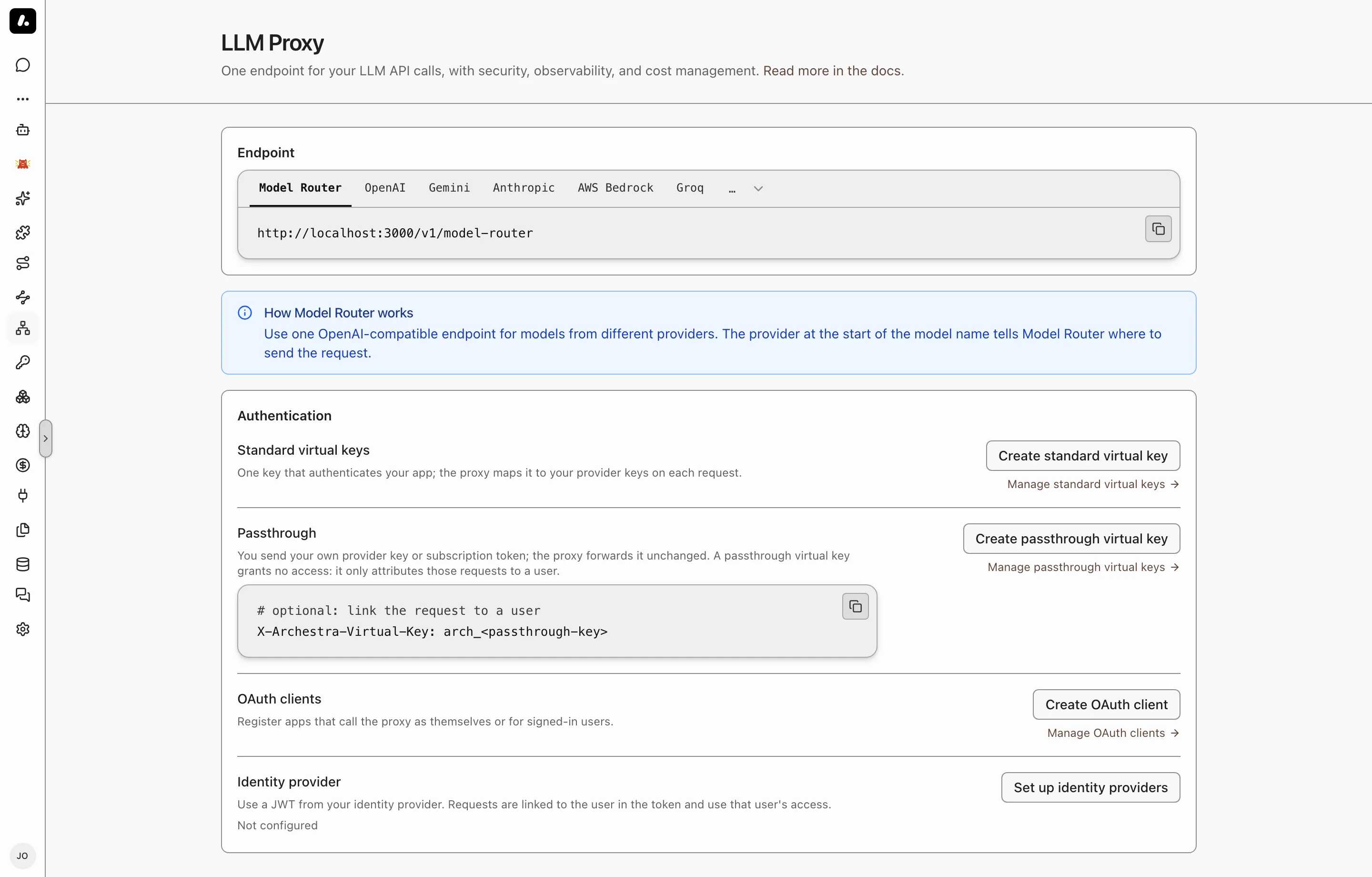
- **Coding agents:** set up Claude Code, Codex, Cursor, or another agent through [Connect](https://archestra.ai/docs/get-started/connect). Connect sets both for you. The agent keeps your own subscription or key.
- **Your own app:**
1. Go to **LLM Proxy** and copy the URL for your provider.
2. Create a credential for the app. For most apps, this is a [standard virtual key](https://archestra.ai/docs/llm-proxy/authentication#standard-virtual-keys).
3. Put the URL and the credential where the app expects the provider's base URL and API key.
4. Send a request, and check that it shows in the [logs](https://archestra.ai/docs/admin/logs).
## Label Requests
Add headers to group requests by app, run, or session in logs and costs. Headers are labels only. They do not prove who the caller is.
| Header | Groups requests by | Example |
| --- | --- | --- |
| `X-Archestra-Agent-Id` | The calling app | `workflow-service` |
| `X-Archestra-User-Id` | The Archestra user, by user ID | A member's user ID |
| `X-Archestra-Session-Id` | Session | `research-123` |
| `X-Archestra-Run-Id` | Run, for metrics | `run-456` |
| `X-Archestra-Meta` | All three, as `//` | `workflow-service/run-456/research-123` |
In `X-Archestra-Meta`, a segment can be empty, but no value can contain `/`. A single header wins over the same value in `X-Archestra-Meta`.
Send the same session header to the [MCP Gateway](https://archestra.ai/docs/mcp/gateway), and the agent's tool calls are filed under that session too.
To tie a request to a person for certain, use a credential that names them. See [Attribution in Logs](https://archestra.ai/docs/llm-proxy/authentication#attribution-in-logs).
`X-Archestra-Session-Id` only labels requests in logs. To enforce Guardrails on custom clients or workflows, send [`X-Appa-Session-ID`](https://archestra.ai/docs/agents/guardrails/clients#session-headers) with the conversation ID. When you send both headers, use the same value.
## What to Know
- Add your providers first. The proxy uses the keys and subscriptions on **Model Providers**. See [Model Providers](https://archestra.ai/docs/llm-proxy/providers).
- Self-hosted models work too, such as Ollama, vLLM, or any OpenAI-compatible server. See [supported providers](https://archestra.ai/docs/llm-proxy/providers#supported-providers).
## Explore
- [LLM Proxy Authentication](https://archestra.ai/docs/llm-proxy/authentication.md): How apps, agents, and people sign in to the LLM Proxy, and whose provider key each call uses
- [Model Providers](https://archestra.ai/docs/llm-proxy/providers.md): Connect provider API keys and personal subscriptions for Chat and the LLM Proxy
- [Costs & Limits](https://archestra.ai/docs/llm-proxy/costs-and-limits.md): See what every model call costs and cap spend, tokens, or requests before bills climb
- [Unified Model API](https://archestra.ai/docs/llm-proxy/unified-model.md): Call models from multiple providers through an OpenAI-compatible endpoint
- [Model Pools](https://archestra.ai/docs/llm-proxy/model-pools.md): Serve one model name from several provider keys, with load balancing and failover
- [Auto Routing](https://archestra.ai/docs/llm-proxy/auto-routing.md): Create auto routers that pick a fast, normal, or smart model for each session of agents, chats and apps, within a daily budget