# Costs & Limits
> See what every model call costs and cap spend, tokens, or requests before bills climb
Every model call through Archestra—from [Chat](https://archestra.ai/docs/chat), [Agents](https://archestra.ai/docs/agents), or an external tool using the [LLM Proxy](https://archestra.ai/docs/llm-proxy)—is metered as it finishes. Break down spend and token usage across your organization in [Costs](https://archestra.ai/docs/llm-proxy/costs-and-limits/costs), cap spend, tokens, or requests in [Limits](https://archestra.ai/docs/llm-proxy/costs-and-limits/limits) before a runaway loop or shared key drives up your bill, and send the numbers to your FinOps tools with [Export Costs](https://archestra.ai/docs/llm-proxy/costs-and-limits/exports).
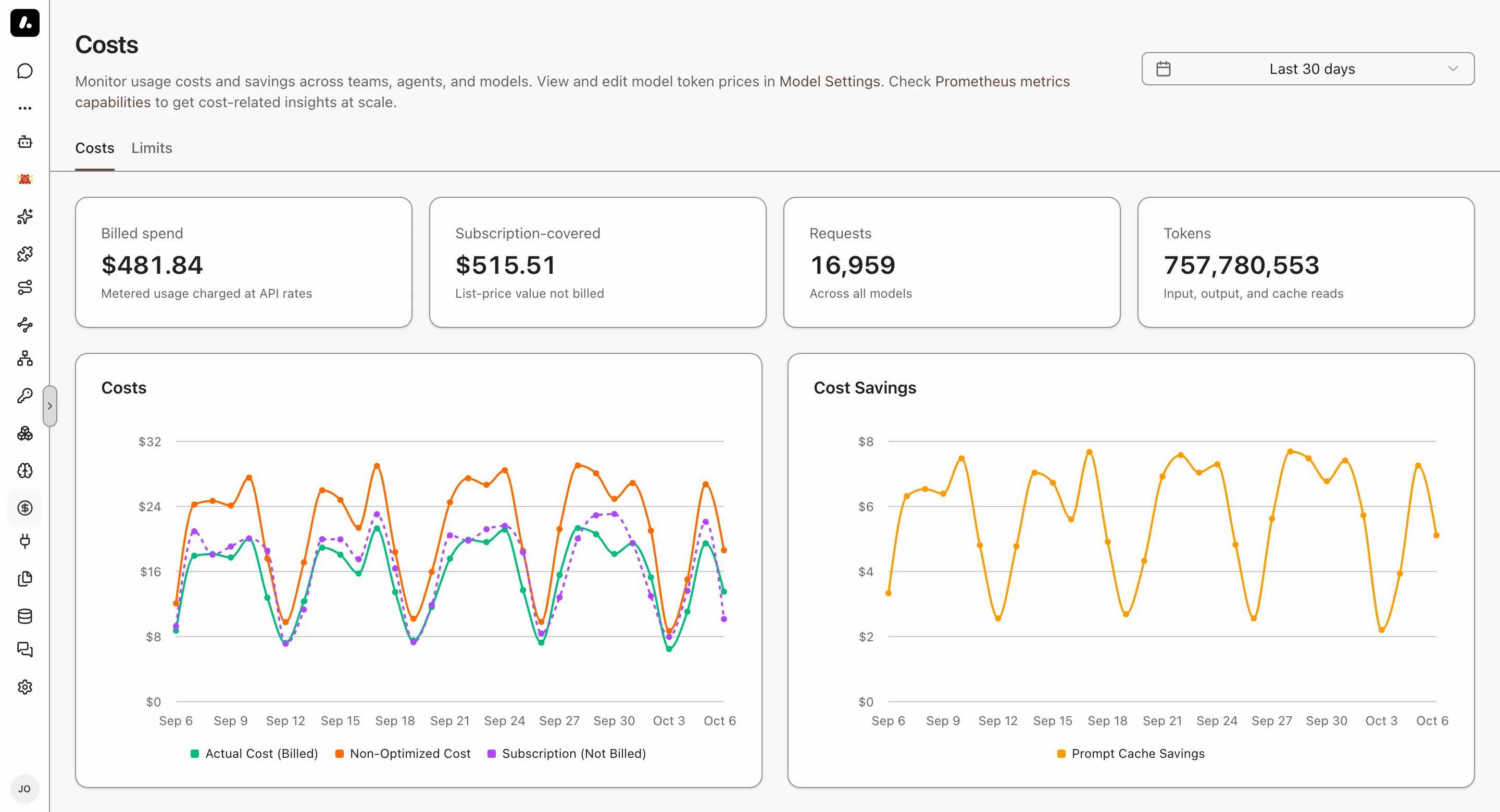
## Subscription vs Metered Cost
Archestra separates per-token API charges from flat-rate subscription traffic so subscription usage never inflates your reported bill or triggers a dollar spend cap. Both [Costs](https://archestra.ai/docs/llm-proxy/costs-and-limits/costs) and [Limits](https://archestra.ai/docs/llm-proxy/costs-and-limits/limits) use this distinction:
| Credential | Counted as | Why |
| --- | --- | --- |
| Claude subscription (`sk-ant-oat01-...` or OAuth), ChatGPT Plus/Pro (Codex OAuth), GitHub Copilot, Microsoft 365 Copilot, Zhipu AI Coding Plan | **Subscription (`$0` billed)** | Covered by a flat monthly seat. Archestra records `$0` toward **API spend** and [spend limits](https://archestra.ai/docs/llm-proxy/costs-and-limits/limits), and tracks what those tokens would have cost at list API rates under **Subscription usage estimate**. |
| Provider API keys (`sk-ant-api03-...`, `sk-...`, Gemini, Bedrock, Vertex AI, Azure, Mistral, Cohere, DeepSeek, Groq, Fireworks, Together, xAI, Cerebras, OpenRouter, vLLM, Ollama) | **Metered (billed at token prices)** | Billed per token. Counts toward **API spend** and [spend limits](https://archestra.ai/docs/llm-proxy/costs-and-limits/limits). |
Both metered and subscription traffic count toward [token and request limits](https://archestra.ai/docs/llm-proxy/costs-and-limits/limits).
- **Override on a credential:** when adding or editing a key in **Credentials → LLM Provider API Keys**, set **Cost tracking** to **Metered (per-token billing)** or **Subscription (included in plan)**. Leave it on **Automatic (detect from key)** to use the table above.
- **Paid overage on a subscription:** if an Anthropic subscription exhausts its plan window and spills into paid Extra Usage (`anthropic-ratelimit-unified-overage-status: active`), Archestra counts that call as metered spend.
- **Disable automatic detection:** set [`ARCHESTRA_LLM_COST_SUBSCRIPTION_AUTODETECT=false`](https://archestra.ai/docs/admin/deployment/configuration#ARCHESTRA_LLM_COST_SUBSCRIPTION_AUTODETECT) so only credentials explicitly marked **Subscription** are excluded from metered spend.
## Where Token Prices Come From
Archestra syncs per-million-token prices (input, output, cache read, and cache write) for common models automatically.
- **OpenRouter:** when OpenRouter returns `usage.cost` on a response, Archestra records that exact amount instead of recalculating from the price table.
- **Custom or self-hosted models:** go to **Models**, edit the model, and open its **Pricing** tab to view or set rates per million tokens (see [Model Pricing, Limits, and Modalities](https://archestra.ai/docs/llm-proxy/providers#model-pricing-limits-and-modalities)). Until you set a price, Archestra charges `$50` per million input and output tokens, or `$30` for `mini`, `nano`, and `haiku` models. vLLM and Ollama models cost `$0`.
- **Prompt caching:** cached input tokens are priced at the model's cache read and cache write rates.
### When a Price Is Missing
A request runs even when its model lacks a price for some of the tokens it uses. Archestra estimates the missing rate and charges the request in full. The spend then shows **Includes estimates** in [Limits](https://archestra.ai/docs/llm-proxy/costs-and-limits/limits) and on the virtual key's spend cap.
- **Cache tokens:** Archestra charges a cache read at half the model's input price, and a cache write at the full input price. Anthropic, Amazon Bedrock, OpenAI, Gemini, and DeepSeek models get their provider's standard cache rates instead.
- **Input or output:** when a provider key lists prices for a model but leaves out its input or output rate, Archestra uses the model's own price.
- **To correct an estimate:** set the missing price on the model, then [recompute its past costs](#recompute-past-costs-after-a-price-change).
- **Limits flagged by an earlier release:** a limit that an earlier release blocked for an unpriced request now blocks only on its spend. It keeps **Includes estimates** until you [reset it](https://archestra.ai/docs/llm-proxy/costs-and-limits/limits#reset-a-spend-limit) or its window ends. Those requests did not record which limits they were charged to, so recompute cannot clear it.
Audio calls, and Azure image calls and file uploads, have no price. Archestra does not estimate them: they record no cost and do not count toward spend. Instead, a hard spend limit that covers them refuses the request. A forwarded provider call, such as creating a batch, has no model to match, so any hard spend limit refuses it.
## Recompute Past Costs After a Price Change
A new price applies to new requests at once. To correct requests already recorded at a wrong or `$0` price, recompute them when you save the price, and [Costs](https://archestra.ai/docs/llm-proxy/costs-and-limits/costs) and [Limits](https://archestra.ai/docs/llm-proxy/costs-and-limits/limits) show what they should have cost.
1. Go to **Models**, edit the model, and open **Pricing**.
2. Set the new prices.
3. Under **Apply new prices to**, pick **Requests since a date** or **All recorded requests**. For a date, drag the start on the cost chart, pick a preset, or pick an exact date and time. Days recorded at `$0` are flagged under the chart.
4. Check the strip above the options: how many requests change, their cost before and after, and how many users are affected. Then click **Save Changes**.
The recompute runs in the background. Reopen **Pricing** to see its progress and, when it finishes, how many requests changed. It needs [`llmModel:update`](https://archestra.ai/docs/reference/permissions#llmModel:update) on the model.
- **OpenRouter:** past requests keep their recorded cost, because many of them carry the amount OpenRouter actually charged.
- **LiteLLM:** when your LiteLLM gateway prices a model per API key, set a custom input and output price first (and cache prices, if its requests used the cache). Every recomputed request uses those prices.
- **Limits:** recompute also corrects the spend limits a request was charged to, while the charge is still in their current window. Subscription requests stay `$0` billed.
## Explore
- [Costs](https://archestra.ai/docs/llm-proxy/costs-and-limits/costs.md): Break down organization-wide API spend, subscription usage, tokens, and requests by credential, team, agent, model, person, app, skill, or label
- [Limits](https://archestra.ai/docs/llm-proxy/costs-and-limits/limits.md): Cap spend, tokens, and requests across your organization, teams, virtual keys, users, agents, OAuth clients, and environments
- [Export Costs](https://archestra.ai/docs/llm-proxy/costs-and-limits/exports.md): Get LLM spend and usage into spreadsheets, scripts, and FinOps tools as one-off downloads, API queries, or scheduled FOCUS files in your own bucket