# MCP Gateway
> One MCP endpoint that gives a client the tools, knowledge, subagents, and skills you choose
Give each client the right tools from one URL, and never hand out a server credential. Point Claude Code, Cursor, or your own app at a gateway. It gets tools from every server behind it:
- Authenticated to every MCP server for you. Archestra uses the person's own account, a shared bot account, or their company identity. See [MCP Server Credentials](https://archestra.ai/docs/mcp/authentication/servers).
- Authenticated the way each client can. Browser OAuth for coding agents, a token for scripts, an OAuth client for your apps, or your identity provider's JWT. See [MCP Gateway Authentication](https://archestra.ai/docs/mcp/authentication/gateway).
- Only the tools you choose. One gateway for engineers, one for support, one for an app.
- Without filling the model's context. The client sees two tools, one to search and one to run, not hundreds.
- With your knowledge, subagents, and skills, through the same URL.
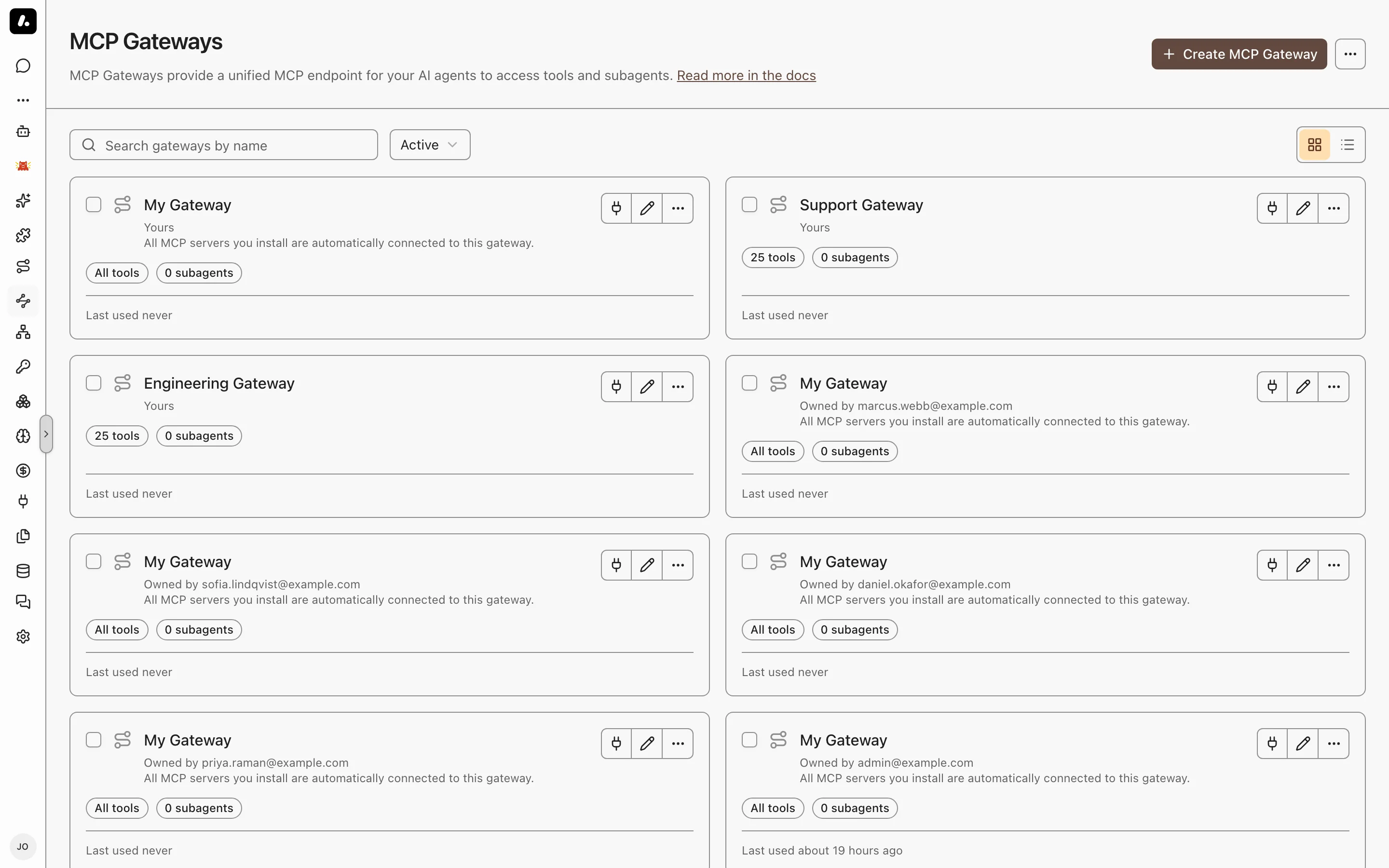
## Create a Gateway
You may not need to. Everyone already has My Gateway; **Settings → MCP → Default personal tool mode** controls whether new personal gateways and My Assistant agents start with all accessible or assigned tools. Create a gateway when a team, an app, or a script needs a fixed set of tools.
1. Go to **MCP Gateways** and click **Create MCP Gateway**.
2. Enter a name, such as `support-tools`. Under **Advanced**, choose the people and teams who can use it.
3. Under **Tools & Knowledge**, pick its tools. See [Choose Its Tools](#choose-its-tools).
4. Click **Create**.
5. Use it from your coding agent: on **Connect**, run the setup command. On the approval page, open **Setup options** and click **Change** next to **Tools** to pick the gateway.
Your agent then lists only the tools you chose. For a script or your own app, use the authentication options on the gateway's **Connect** tab. See [MCP Gateway Authentication](https://archestra.ai/docs/mcp/authentication/gateway).
## Choose Its Tools
Give the client every tool its person can use, or only the ones you pick. Set it under **Tools & Knowledge** on the gateway's **Settings** tab.
| Mode | The client gets | Use it for |
| --- | --- | --- |
| **All tools** | Every tool the signed-in person can use. New servers show up by themselves. | A person's own coding agent |
| **Manual** | Only the tools you pick. For each, pick a shared account, or **Resolve at call time** to use each person's own. | A team, an app, or a script |
- **Subagents** go here too. The client gets one `agent__` tool for each [subagent](https://archestra.ai/docs/agents/subagents), to hand it a task.
- **Progressive tool loading** is on by default: the client gets [`search_tools`](https://archestra.ai/docs/reference/archestra-mcp-server#search_tools) and [`run_tool`](https://archestra.ai/docs/reference/archestra-mcp-server#run_tool). Turn it off in Manual mode when the client needs the full list up front.
- **Better tool search** runs automatically when your organization has a default LLM key. Archestra sends each MCP tool's name, description, and input schema to that provider once to generate search keywords, and the cost appears in the LLM logs.
- A service-account key acts with the account's granted access, not the personal access of the person who created the key. Legacy team and organization tokens migrate to these accounts.
## Search Your Knowledge From Any Client
Let Claude Code or Cursor answer from your company's documents, with links to the sources. The gateway brings your [knowledge bases](https://archestra.ai/docs/knowledge) into any MCP client: Confluence, Google Drive, SharePoint, uploaded files, and [more](https://archestra.ai/docs/knowledge/connectors).
1. On the gateway, go to **Tools & Knowledge**.
2. Choose **All tools** for every source the person can use, or **Manual** and pick the sources.
3. Save. The client gets [`query_knowledge_sources`](https://archestra.ai/docs/reference/archestra-mcp-server#query_knowledge_sources).
4. Ask the client a question, such as "What is our deployment rollback procedure?". Each result comes with its document title and link.
Each person finds only the documents [they can open](https://archestra.ai/docs/knowledge#permissions). A service-account key, including a migrated team or organization token, finds sources granted to that account, its team, or everyone in the organization.
## Publish Skills
Give every MCP client the same [skills](https://archestra.ai/docs/agents/skills), from one place. The gateway publishes them as `skill://` resources. Clients that support the draft MCP Skills extension list and read them like local skills. Other clients do not see them.
1. Open the gateway, go to **Advanced**, and find **Skills over MCP**.
2. Pick **All skills** for every organization skill in the gateway's [environment](https://archestra.ai/docs/admin/environments), or **Manual** to choose.
3. Save, then check that your client lists a skill.
**Manual** says why a skill cannot be published. **All skills** skips it. Templated skills, other people's personal skills, and names that break the [Agent Skills specification](https://agentskills.io/specification) cannot be published.
## What to Know
- Gateway access is its own grant. A person who can use the gateway can use its shared tools, even if they cannot see the server in MCP Registry.
- **Custom headers:** to pass headers from the client to the server, such as a tenant ID, list them under **Advanced → Custom headers**. Stdio servers cannot get headers.
- **Description:** the client gives it to its model as the server's instructions when it connects. Say what the gateway is for and which of its tools to prefer.