
Connect Agent to MS Teams
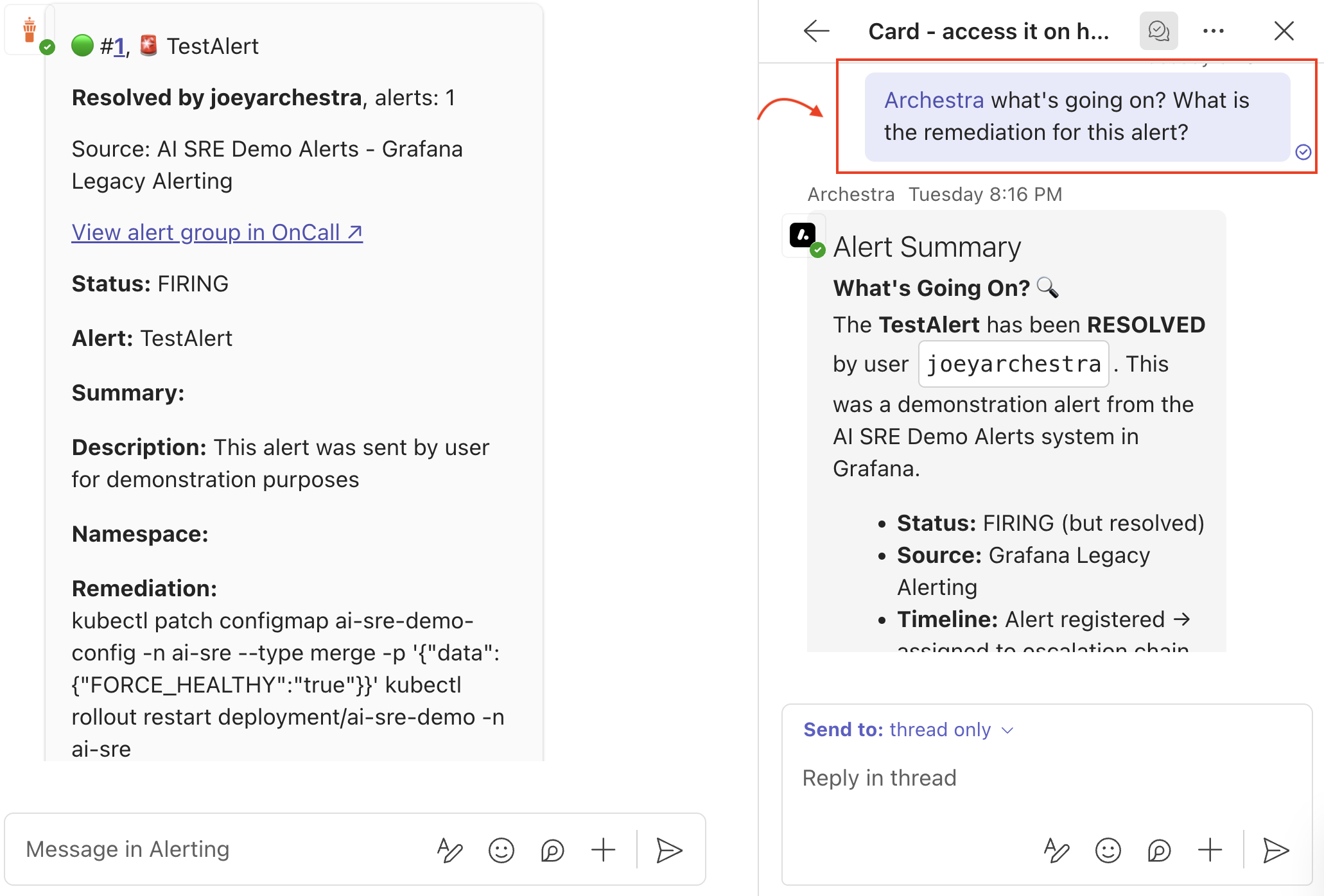
In this guide, we'll build a simple MS Teams app that connects to your Archestra agent via A2A. When mentioned in a thread, the app forwards the full thread history to your agent. The agent follows your prompts, performs actions, and the app displays the reply.
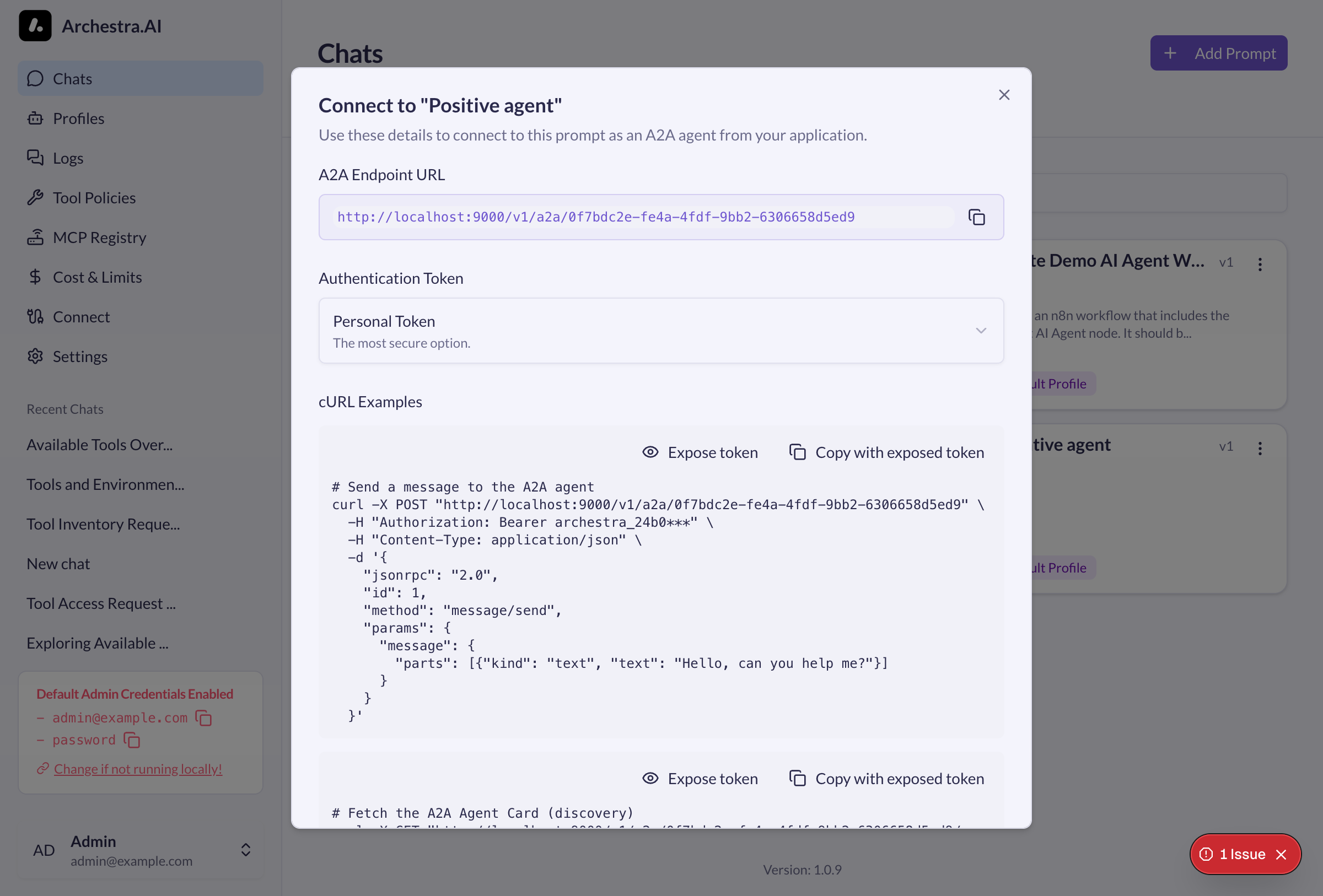
Get A2A Endpoint of your Archestra agent from Archestra
In Archestra, you can build an agent by defining its prompt and connecting MCP tools. Once configured, you can interact with it directly from the Archestra chat or trigger it via A2A from anywhere — including MS Teams.
- Open Archestra and go to Chats
- Find your prompt and click the connect icon (plug icon)
- Copy the A2A Endpoint URL and Authentication Token
You'll need these later for your MS Teams app as ARCHESTRA_PROMPT_A2A_ENDPOINT and ARCHESTRA_PROMPT_A2A_TOKEN.
Create Azure Bot
- Go to portal.azure.com > Create a resource > Azure Bot
- Fill in bot handle, subscription, resource group
- Under Microsoft App ID, select Create new Microsoft App ID
- After creation, go to Settings > Configuration
- Copy the Microsoft App ID
- Click Manage Password link next to Microsoft App ID
- In the App Registration page, go to Certificates & secrets > New client secret
- Copy the secret value (shown only once)
- Back in Bot Configuration, set Messaging endpoint to
https://your-domain.com/api/messages(or ngrok URL for local dev) - Go to Channels > Connect to channels > add Microsoft Teams
- Back in App Registration, go to API permissions > Add a permission > Microsoft Graph > Application permissions
- Add
ChannelMessage.Read.All(for thread history) - Click Grant admin consent
Teams App Manifest
Create a folder with color.png (192x192), outline.png (32x32) and manifest.json:


{
  "$schema": "https://developer.microsoft.com/json-schemas/teams/v1.16/MicrosoftTeams.schema.json",
  "manifestVersion": "1.16",
  "version": "1.0.0",
  "id": "{{BOT_ID}}",
  "packageName": "com.archestra.bot",
  "developer": {
    "name": "Your Company",
    "websiteUrl": "https://archestra.ai",
    "privacyUrl": "https://archestra.ai/privacy",
    "termsOfUseUrl": "https://archestra.ai/terms"
  },
  "name": { "short": "Archestra", "full": "Archestra Bot" },
  "description": { "short": "Ask Archestra", "full": "Chat with Archestra A2A agent" },
  "icons": { "outline": "outline.png", "color": "color.png" },
  "accentColor": "#FFFFFF",
  "bots": [
    {
      "botId": "{{BOT_ID}}",
      "scopes": ["personal", "team", "groupchat"],
      "supportsFiles": false,
      "isNotificationOnly": false
    }
  ],
  "permissions": ["identity", "messageTeamMembers"],
  "validDomains": []
}
Replace {{BOT_ID}} with your Azure Bot App ID. Zip the folder contents, you'll need it later to upload to MS Teams apps.
Bot Code
pnpm init
pnpm add botbuilder express tsx dotenv
Create index.ts:
import "dotenv/config";
import {
  CloudAdapter,
  ConfigurationBotFrameworkAuthentication,
  TurnContext,
} from "botbuilder";
import { TeamsInfo } from "botbuilder";
import express from "express";

const auth = new ConfigurationBotFrameworkAuthentication({
  MicrosoftAppId: process.env.BOT_ID,
  MicrosoftAppPassword: process.env.BOT_PASSWORD,
  MicrosoftAppTenantId: process.env.BOT_TENANT_ID,
  MicrosoftAppType: "SingleTenant",
});
const adapter = new CloudAdapter(auth);

adapter.onTurnError = async (context, error) => {
  console.error(error);
  await context.sendActivity("Error occurred");
};

const app = express();
app.use(express.json());

// Get Microsoft Graph API token
async function getGraphToken(): Promise<string> {
  const res = await fetch(
    `https://login.microsoftonline.com/${process.env.BOT_TENANT_ID}/oauth2/v2.0/token`,
    {
      method: "POST",
      headers: { "Content-Type": "application/x-www-form-urlencoded" },
      body: new URLSearchParams({
        client_id: process.env.BOT_ID!,
        client_secret: process.env.BOT_PASSWORD!,
        scope: "https://graph.microsoft.com/.default",
        grant_type: "client_credentials",
      }),
    }
  );
  const data = await res.json();
  return data.access_token;
}

// Extract text content from Adaptive Card JSON
function extractCardText(card: any): string {
  const texts: string[] = [];
  function traverse(obj: any) {
    if (!obj) return;
    if (obj.type === "TextBlock" && obj.text) texts.push(obj.text);
    if (obj.type === "FactSet" && obj.facts) {
      for (const fact of obj.facts) {
        if (fact.title && fact.value) texts.push(`${fact.title}: ${fact.value}`);
      }
    }
    if (Array.isArray(obj.body)) obj.body.forEach(traverse);
    if (Array.isArray(obj.items)) obj.items.forEach(traverse);
    if (Array.isArray(obj.columns)) {
      obj.columns.forEach((col: any) => col.items?.forEach(traverse));
    }
  }
  traverse(card);
  return texts.join("\n");
}

// Fetch thread history from Microsoft Graph API
async function getThreadHistory(
  teamId: string,
  channelId: string,
  messageId: string
): Promise<string | null> {
  try {
    const token = await getGraphToken();
    const parentRes = await fetch(
      `https://graph.microsoft.com/v1.0/teams/${teamId}/channels/${channelId}/messages/${messageId}`,
      { headers: { Authorization: `Bearer ${token}` } }
    );
    if (!parentRes.ok) return null;
    const parent = await parentRes.json();

    const repliesRes = await fetch(
      `https://graph.microsoft.com/v1.0/teams/${teamId}/channels/${channelId}/messages/${messageId}/replies`,
      { headers: { Authorization: `Bearer ${token}` } }
    );
    const replies = repliesRes.ok ? await repliesRes.json() : { value: [] };

    const messages = [parent, ...(replies.value || [])];
    return messages
      .map((m: any) => {
        const sender = m.from?.user?.displayName || "User";
        let content = m.body?.content || "";
        // Extract Adaptive Card content if present
        if (m.attachments?.length) {
          for (const att of m.attachments) {
            if (att.contentType === "application/vnd.microsoft.card.adaptive") {
              try {
                const card = typeof att.content === "string" ? JSON.parse(att.content) : att.content;
                const cardText = extractCardText(card);
                if (cardText) content += "\n" + cardText;
              } catch (e) {}
            }
          }
        }
        return `${sender}: ${content}`;
      })
      .join("\n");
  } catch (e) {
    return null;
  }
}

// Strip HTML tags and bot mentions
function cleanMessage(text: string): string {
  return text.replace(/<at>.*?<\/at>\s*/g, "").replace(/<[^>]*>/g, "").trim();
}

app.post("/api/messages", async (req, res) => {
  await adapter.process(req, res, async (context: TurnContext) => {
    if (context.activity.type === "message") {
      let messageText = cleanMessage(context.activity.text || "");

      // Get thread history if in a thread
      const match = context.activity.conversation.id.match(/messageid=(\d+)/);
      if (match) {
        try {
          const teamDetails = await TeamsInfo.getTeamDetails(context);
          const teamId = teamDetails.aadGroupId;
          const channelId = context.activity.channelData?.channel?.id;
          if (teamId && channelId) {
            const history = await getThreadHistory(teamId, channelId, match[1]);
            if (history) {
              messageText = `Thread context:\n${cleanMessage(history)}\n\nUser question: ${messageText}`;
            }
          }
        } catch (e) {}
      }

      const response = await fetch(process.env.ARCHESTRA_PROMPT_A2A_ENDPOINT!, {
        method: "POST",
        headers: {
          Authorization: `Bearer ${process.env.ARCHESTRA_PROMPT_A2A_TOKEN}`,
          "Content-Type": "application/json",
        },
        body: JSON.stringify({
          jsonrpc: "2.0",
          id: 1,
          method: "message/send",
          params: {
            message: { parts: [{ kind: "text", text: messageText }] },
          },
        }),
      });
      const data = await response.json();
      await context.sendActivity(data.result?.parts?.[0]?.text ?? "No response");
    }
  });
});

app.listen(3978, () => console.log("Bot listening on 3978"));
Environment Variables
| Variable | Description |
|---|---|
BOT_ID | Azure Bot App ID |
BOT_PASSWORD | Azure Bot Client Secret |
BOT_TENANT_ID | Azure AD Tenant ID (for Single Tenant bots) |
ARCHESTRA_PROMPT_A2A_ENDPOINT | Full A2A endpoint URL (e.g. http://localhost:9000/v1/a2a/{promptId}) |
ARCHESTRA_PROMPT_A2A_TOKEN | A2A token (e.g. archestra_24b0...) |
Run
For local development:
# Terminal 1: Start bot
pnpm tsx index.ts

# Terminal 2: Expose via ngrok
ngrok http 3978
Update your Azure Bot messaging endpoint with the ngrok URL.
In Teams: Apps > Manage your apps > Upload an app > select your manifest zip. Start a chat with the bot.
Troubleshooting
"You don't have access to this app" - Your org has disabled custom app uploads. Options:
- If admin: Teams Admin Center > Teams apps > Setup policies > Enable Upload custom apps
- If not admin: Ask IT to enable sideloading or approve the app via Teams Developer Portal
- For testing: Use a free Microsoft 365 Developer tenant