
LLM Proxy
See every model call your company makes: who made it, which model, what it cost, and what the model tried to do. A developer's Claude Code session, a support bot, and a nightly job show in one log. Each has its cost, per person.
The LLM Proxy sits between your clients and your model providers. Clients keep their usual API. Archestra adds:
- Guardrails on every tool call the model asks for. Archestra blocks the calls your policy does not allow. See Guardrails.
- No provider keys in your apps. An app gets a virtual key. Archestra holds the real key, and you can revoke one app's access alone.
- One URL for every provider. The Model Router sends
anthropic:claude-sonnet-4-6to Anthropic andopenai:gpt-5.4to OpenAI. - Cost per person, team, and app, with budgets that block requests when spend reaches them. Claude and ChatGPT subscription traffic shows separately, at $0 billed. See Costs & Limits.
- A log of every request, with the model, the caller, tokens, and cost. See Logs and Auditing.
Start Using It
An app or agent uses the proxy when you change two things: its base URL and its API key. Its code stays the same.
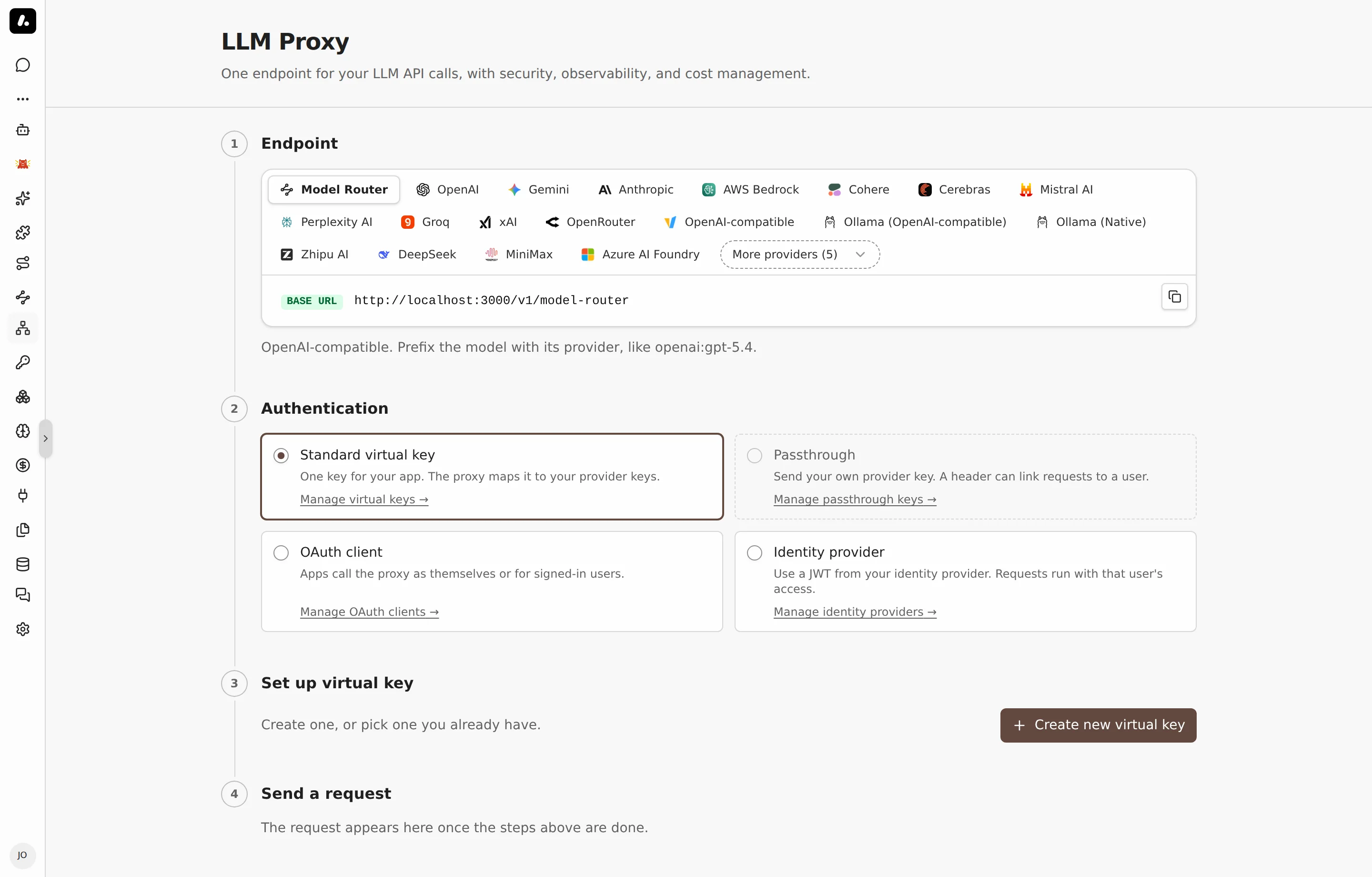
- Coding agents: set up Claude Code, Codex, Cursor, or another agent through Connect. Connect sets both for you. The agent keeps your own subscription or key.
- Your own app:
- Go to LLM Proxy and copy the URL for your provider.
- Create a credential for the app. For most apps, this is a standard virtual key.
- Put the URL and the credential where the app expects the provider's base URL and API key.
- Send a request, and check that it shows in the logs.
Label Requests
Add headers to group requests by app, run, or session in logs and costs. Headers are labels only. They do not prove who the caller is.
| Header | Groups requests by | Example |
|---|---|---|
X-Archestra-Agent-Id | The calling app | workflow-service |
X-Archestra-User-Id | The Archestra user, by user ID | A member's user ID |
X-Archestra-Session-Id | Session | research-123 |
X-Archestra-Run-Id | Run, for metrics | run-456 |
X-Archestra-Meta | All three, as <agent-id>/<run-id>/<session-id> | workflow-service/run-456/research-123 |
In X-Archestra-Meta, a segment can be empty, but no value can contain /. A single header wins over the same value in X-Archestra-Meta.
To tie a request to a person for certain, use a credential that names them. See Attribution in Logs.
For Guardrails, send a session ID too. Claude Code, Codex CLI, and OpenCode send it by themselves. Any other client adds X-Appa-Session-ID. See Session Headers.
What to Know
- Add your providers first. The proxy uses the keys and subscriptions on Model Providers. See Model Providers.
- Self-hosted models work too, such as Ollama, vLLM, or any OpenAI-compatible server. See supported providers.