
OpenAPPA
Configure policy for agent tool calls and results
OpenAPPA controls which tools an agent can use as it reads data and acts on it. Its policy tracks who may receive data and how much to trust it. A tool call can be allowed early in a session and refused after the agent reads restricted or untrusted content.
The lethal trifecta is the combination of private data access, untrusted content, and a way to send data outside your organization. An attacker may hide instructions in a page or message the agent reads. OpenAPPA limits later tool calls and recipients as the session's data label changes. See How OpenAPPA works for the trust and audience model.
Enable OpenAPPA
Set ARCHESTRA_OPENAPPA_ENABLED=true and restart the backend to make the workspace available. See the deployment settings for related requirements. Create my policy opens the policy chat to draft your first policy. When an administrator approves it, the policy is saved and enforcement turns on. Later saves leave enforcement unchanged. Administrators turn enforcement on or off with the switch on the Policy tab. The current policy must pass validation before enforcement turns on. Once enforcement is on, Connect GitHub keeps the policy in a repository for review through pull requests.
The first policy uses the built-in protections without requiring GitHub setup or new credentials. You review examples of what it allows and blocks, along with its limits, before approving. Choose Show TOML to inspect the exact proposed policy without saving it. An unchanged starter still needs this first save. Add further batteries and detailed rules after setup.
The feature makes the workspace available; the switch controls enforcement. Administrators can turn enforcement off at any time. The starting policy includes the archestra battery for built-in tools. Its catch-all rule adds no restrictions to other tools.
Organization Audience
The starting policy treats your organization's members as its internal audience. OpenAPPA reads membership from Archestra, so the audience stays current as people join and leave. A policy can also name one team, with its child teams, or one user — archestra:team/support, for example.
Each session acts for the signed-in user, identified by their email. Sessions started by an app or a virtual key act for no user.
Policy Targets
Open OpenAPPA → Overview to see MCP gateways and MCP servers with tools. Coverage counts tools with an enforced rule that applies without an argument condition. Conditional rules remain visible in the tool details. Follow a source link to the rule in your policy or an included battery.
Choose a target's chat action to start a review focused on that gateway or server. Reopen a saved chat to continue with the same target.
Configure with the Agent
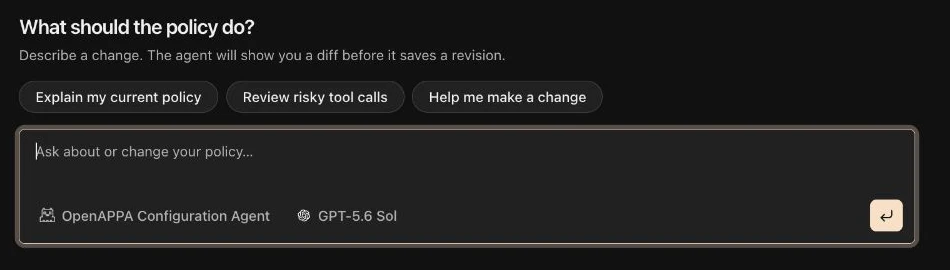
Select Configure with chat on the OpenAPPA Policy tab and describe what you want to protect. The built-in agent reads the current policy and explains proposed changes before publishing. Ask for the diff when you want to inspect the policy text. You can also ask it to explain the policy without changing anything.
The agent needs an available LLM provider key. If none is configured, the configuration chat offers provider setup. Configuration sessions appear in AI chat history. Reopen one there to continue the conversation with its agent and model fixed.
Ask the agent to identify the tools and data flows you want to govern. Review the proposed changes and validation warnings before publishing. A valid policy can still contain a battery that governs no tools.
The agent can save a validated local revision. If you connect GitHub sync, it opens a pull request instead. Local revisions apply to new conversations; existing conversations keep the policy they started with.
Policy and Effective Policy
Open OpenAPPA → Policy to inspect your policy. In the Policy subtab, choose organization.appa.toml or search included batteries. The selector shows each battery's status. Select a source tag in Overview to open its matching TOML line here. These files are read-only references; use the agent to propose changes. The Effective policy subtab shows the composed document.
Review the effective policy after a change. It reports batteries that could not become active and shows the last working document if composition fails.
Rules can name one exact tool. A * rule covers tools without a more specific rule. Partial names such as server__* are invalid. To govern a whole MCP server, attach a battery that covers its tools.
OpenAPPA evaluates client-run tool calls before they run. A refused call returns a reason and available remedies to the agent. Calls that require human approval remain blocked until the required approval is given.
An external client can use the LLM proxy without connecting an MCP gateway. Allowed tool calls still run. If a call is blocked, the proxy returns the refusal as text; connect the MCP gateway to use remedy plans and approvals.
Provider-hosted tools run inside the model provider. OpenAPPA accepts known hosted declarations but cannot check each call before it runs. OpenAI Responses web search is an exception: the proxy checks its result before the client receives it. Azure Responses hosted web search is refused because its result cannot be checked. Unknown tool types and client-run tools the proxy cannot gate are also refused. Other hosted tool results are not governed as client-run calls. A policy rule cannot refuse all hosted tools with a signed offer to use a local tool instead.
For policy fields and examples, see the OpenAPPA policy configuration reference.
Batteries
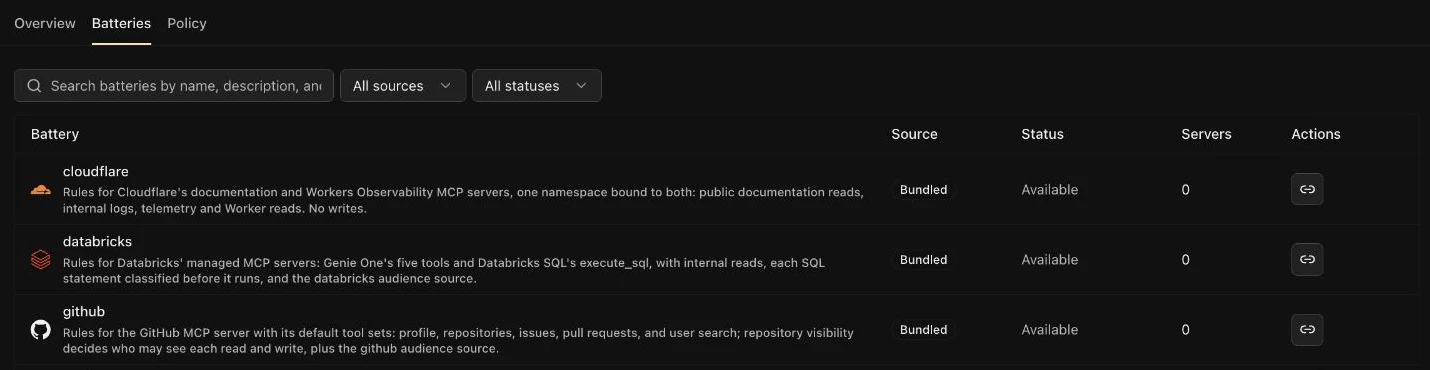
A battery is a reusable OpenAPPA policy package. Open OpenAPPA → Batteries to attach a bundled battery to a synced MCP server. You can also include one while setting up a matching server, ask the configuration agent to attach it, or upload your own package. Annotator-only batteries apply across the organization and need no server.
Attaching a battery adds its file to the policy's include list and binds its server alias. The root policy and included batteries compose into one effective policy. Root rules take precedence over included rules.
Some batteries consult a provider. Bind each required variable to an organization runtime credential in the Batteries panel. An included battery may need a server, credential, or helper runtime before it becomes active. An annotator-only battery also needs a policy rule to route tools to its annotator. The panel shows its status and what to fix.
Helpers run in the code execution sandbox. Enable that runtime before using a battery with helper scripts. The OpenAPPA battery guide explains package structure and rule order.
External Consults
Each call OpenAPPA makes to a provider — an annotator, authority, or sanitizer — is recorded as an external consult. Go to Logs → Guardrail consults to review them. Filter by provider name, outcome, session, or time range. Open a consult to see the tool call, the provider's answer, and its diagnostics. For Jev, the diagnostics show each label's probabilities and the decision. Export JSONL downloads the consults that match your filters, so you can analyze them offline.
GitHub Policy Review
Administrators can connect a repository and GitHub App from the configuration chat or Settings → OpenAPPA. The agent then creates a pull request for a policy change. The new policy takes effect after the pull request is merged and the repository sync succeeds.
The repository owns the policy text while sync is configured. Battery changes must be made through the agent's pull request or in the repository. A pull that changes credential bindings or drops deployed batteries can be held for administrator review. Use Accept repository text in the Repository text held notice on OpenAPPA → Batteries to release it.
Load Tools When Needed
When an agent uses Load tools when needed, it calls run_tool to dispatch a selected tool. OpenAPPA evaluates the selected tool and its arguments, just as it does for a direct call. A refused dispatch names the selected tool.
Protected Session Mark
The proxy can add a two-line mark to a protected session's first reply and to compaction summaries. It identifies the session that authored the reply. Spawned subagents show a related mark when they start and finish. The proxy removes these marks before sending requests to the model provider and before writing logs; most replies have no mark. Signed tool-call IDs provide separate lineage evidence.
Use Case: Support Search and Ticket Updates
At fictional Example Co, support-assistant searches public troubleshooting pages and updates internal tickets. Its administrator asks the OpenAPPA Configuration Agent to mark web search results as suspicious and require trusted context before ticket updates.
The agent identifies installed tool names, explains a policy change, and validates it. The administrator reviews the change before publishing. After a public page enters a conversation, OpenAPPA refuses a ticket update that requires trusted context. A new conversation starts with the updated policy; an existing one keeps its original revision.