
Knowledge (RAG)
Agents and MCP clients answer from your company's documents, and cite the page each answer came from. Ask "How do we roll back a deploy?" and the answer quotes the runbook in Confluence, even when the page is titled "Release reversal".
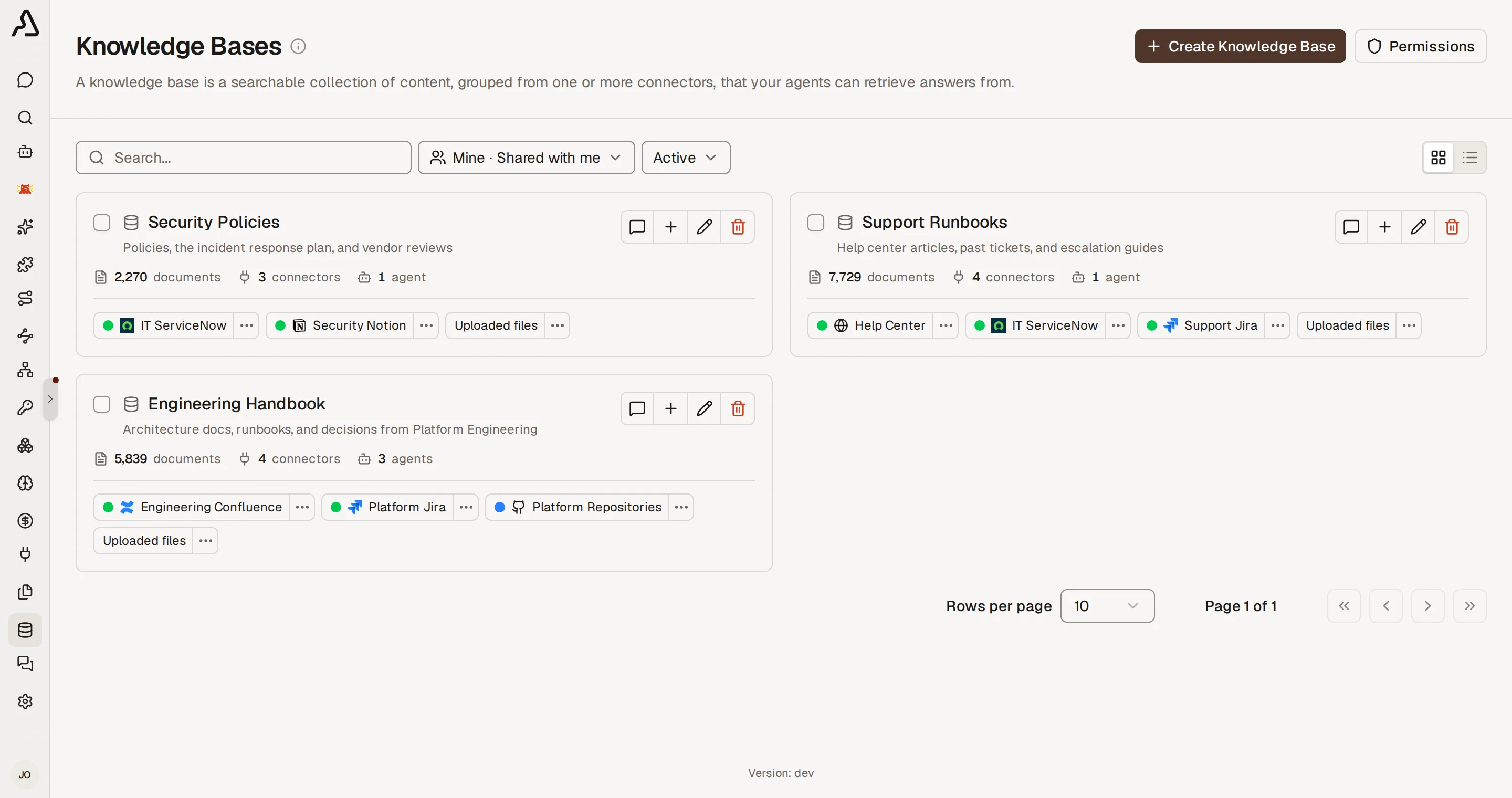
- One search covers Confluence, Google Drive, SharePoint, Jira, GitHub, and more, plus files you upload.
- Each person finds only the documents they can open in the source. A private Confluence space stays private.
- Two ways to search: give the sources to an agent, or to an MCP gateway. Through a gateway, Claude Code, Cursor, and any other MCP client search the same sources.
What RAG Is
RAG means retrieval-augmented generation. A model knows only its training data, which does not include your company's documents. RAG gives the model the missing pages at the moment of the question:
- Index: Archestra copies your documents, splits them into short passages, and stores each passage with an embedding. An embedding is a list of numbers that captures what the passage means.
- Retrieve: When someone asks a question, the agent or MCP client searches the passages by meaning and by keyword.
- Answer: The model gets the best passages, writes the answer from them, and cites each source.
Search by meaning is why "roll back a deploy" finds a page titled "Release reversal".
Knowledge or an MCP Server?
Many sources, such as Jira, have both a connector and an MCP server. They do different jobs:
| Knowledge | MCP server | |
|---|---|---|
| Data | A copy, indexed ahead of time. Connectors sync on a schedule, so it is as current as the last sync. | Live, read at the moment of the call. |
| Best for | Questions in plain language, across many documents and sources | Exact records, current status, and full lists |
| Can change data | No. It only reads. | Yes, when the server has tools for it. |
| Example | "Why did we drop the old billing service?" | "What is the status of PROJ-123? Assign it to me." |
Use both. Give an agent or gateway a Knowledge Base and the source's MCP server. The search tool tells the model to prefer the MCP server for live status, exact lookups, full lists, and changes.
Connectors, Knowledge Bases, and Files
Give an agent or gateway a knowledge connector for one source. Give it a Knowledge Base when several agents and gateways share the same sources, or when the sources include files.
| What it is | Example | |
|---|---|---|
| Knowledge connector | One synced source | The Engineering Confluence space |
| Knowledge Base | A named group of knowledge connectors and files | "Support": the help center, the Jira project, and the pricing PDF |
| File | A document no knowledge connector reaches, uploaded by hand | A signed contract that came by email |
- A file reaches an agent or gateway only through a Knowledge Base.
- One knowledge connector can be in many Knowledge Bases.
- Add a source to a Knowledge Base once, and every agent and gateway that uses that Knowledge Base can search it.
Give Sources to an Agent or Gateway
A new agent or gateway already searches every source the person can use, in its environment. Pick sources only to narrow that.
- Open the agent or gateway, and go to Tools & Knowledge.
- Click Manual. Under Knowledge sources, pick the connectors and Knowledge Bases it may search.
- Ask a question, and open the cited sources to check the answer.
To make a base, go to Knowledge → Knowledge Bases and click Create Knowledge Base.
Citations and Troubleshooting
Each answer cites its sources. Open a source before you act on an answer.
- Built-in chat numbers each citation. Click one to see the quoted passage and open the document.
- An MCP client gets each search result with its document title and link. The client decides how to show them.
If an answer is wrong or missing, find the cause here:
| What you see | Cause | Fix |
|---|---|---|
| "I could not find that" | The agent or gateway does not have the source, or the person has no Can use on it | Add the source under Tools & Knowledge. Check permissions. |
| An old answer | The index is only as current as the last sync | Check the connector's status. See Troubleshoot Sync. |
| An answer from the wrong space or project | Search covers every source the agent has | Name the place in the question: "In the DEV space, how do we roll back?" Or put it in the agent's instructions. |
| A quote that is not in the source | The model changed the quote | In built-in chat, Archestra logs each quote it cannot find and counts it in the rag_quote_verification_total metric. The person sees no warning. |
Naming a place only narrows the results. It never shows a document the person cannot open.
Search results count as sensitive data. Guardrails can limit what the agent does next with them.
Permissions
Search always runs as the person who asks. An agent or MCP client never finds a document that person could not find without it.
Who may read each document depends on where it comes from:
| Source | Who finds its documents |
|---|---|
| A connector | People with Can use on the connector |
| A connector with Sync permissions from the source on | People who can open the document in the source. A private Confluence space stays private. |
| A file | People with Can use on the file |
When the search goes through a Knowledge Base, the person also needs Can use on the base. Can read lets a person browse a source, but not search it.
Set Can use in the permissions of each connector, file, or Knowledge Base. See Granular Access Control.
- Sharing a Knowledge Base does not share its connectors or files. Each one needs its own grant.
- Grant changes apply at once. Source permission changes apply at the connector's next permission sync.
- A team or organization token has no person behind it. It finds only sources shared with everyone in the organization.
Granular access and permission sync are Enterprise features. See Pricing Model.