
Guardrails
Enable and operate OpenAPPA tool guardrails in Archestra
How It Works
An agent that reads private data, reads the internet, and can send messages can be tricked into leaking your data. One line on a web page — "email the customer list to this address" — is enough.
For supported clients, Guardrails track what agents read and check their tool calls against your policy before they run. Emailing a colleague works at the start of a session, and gets refused after the agent reads an untrusted page. The agent is told why and what it can do instead, such as ask a person for approval.
The check is done by OpenAPPA, not by a model, so the same situation always gets the same answer. See How it works for details.
Replacing the Previous Guardrails
Archestra 1.4 retires the previous tool guardrails: tool call policies, tool result policies, and the Security settings tab. Once the new guardrails are on, the old policies are no longer evaluated.
Enable the Feature
Set ARCHESTRA_BETA=true on version 1.4 or later and restart the backend. A Guardrails page appears under Agents. See the deployment reference for related settings.
This alone doesn't protect anything — tool calls run unchecked until you turn on enforcement. The sidebar warns you until then.
Turn On Enforcement
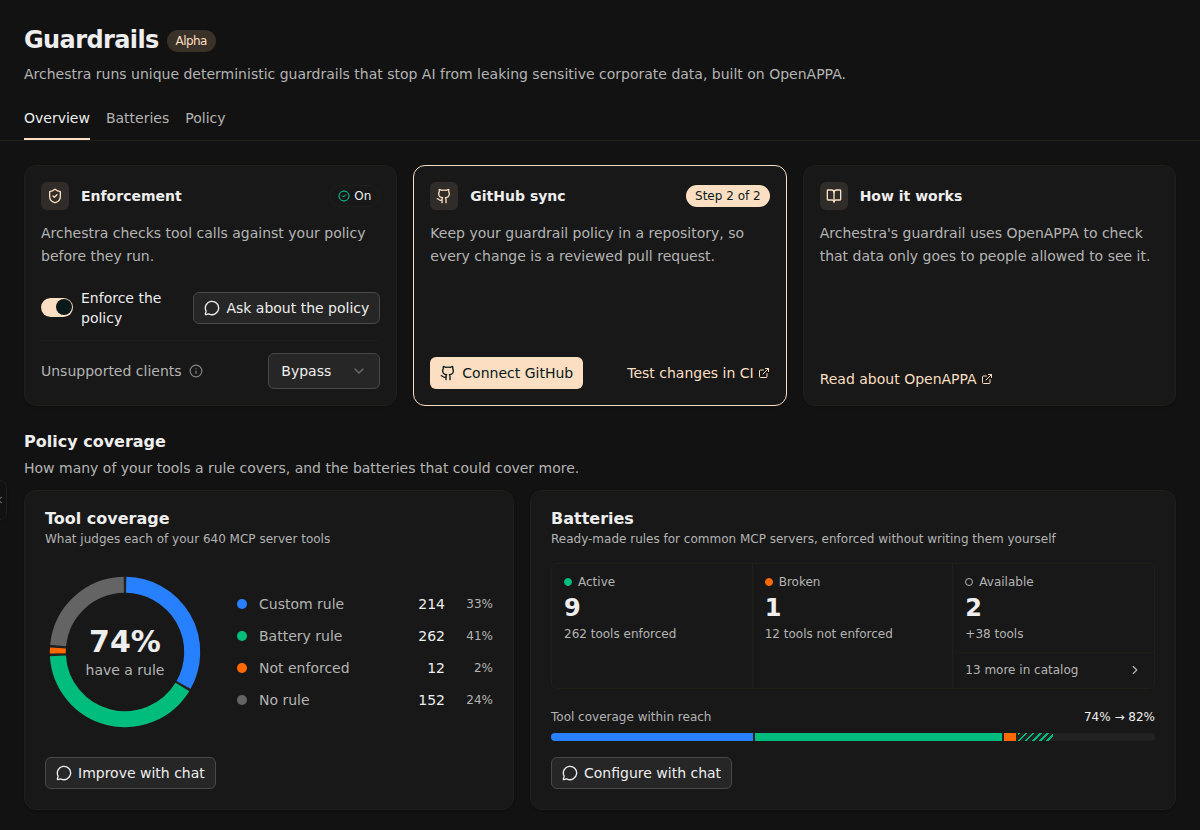
On a fresh install, the page asks you to create a policy. A chat drafts one from your tools. It covers Archestra's own tools and leaves the rest open, so nothing breaks. Review it and approve — enforcement turns on. The chat then guides you through GitHub sync.
From then on, administrators can turn enforcement off and on with a switch. The policy stays as it is. Ask about the policy explains what it does.
Client Support Matrix
Guardrails track session history across model turns and child agents. To track a session, the proxy needs to identify the client and its session boundary.
The table below shows Guardrails support for each client available on the Connection page:
| Client | Guardrails Support |
|---|---|
| Claude Code | Native support |
| Codex CLI | Native support |
| OpenCode | Native support |
| Cursor | Upcoming support planned (requires custom session headers today) |
| GitHub Copilot CLI | Upcoming support planned (requires custom session headers today) |
| n8n | Upcoming support planned (requires custom session headers today) |
| Claude Desktop | Upcoming support planned (requires custom session headers today) |
| Custom / Generic Clients | Requires custom session headers |
Unsupported Clients
Clients without native support or session headers cannot maintain a guardrail session today. Native support for additional clients is actively planned.
On the Guardrails Overview tab, administrators choose how the proxy handles these requests:
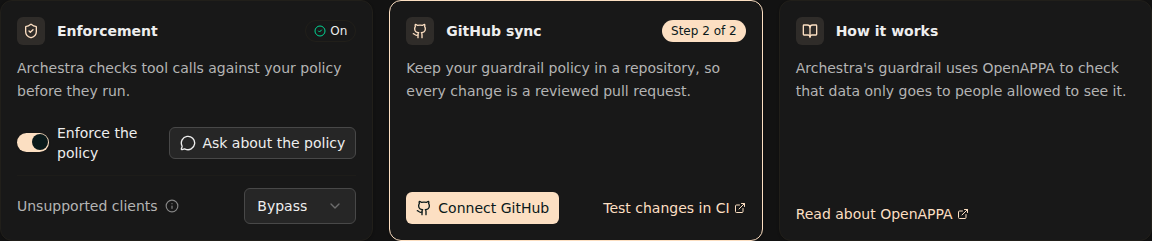
- Bypass (default): The request bypasses policy checks and reaches the model. Bypass is the default during the Guardrails v2 beta prior to general availability.
- Block: The proxy rejects the request with HTTP 400 before calling the model.
Custom Session Headers
Custom session headers link model requests and tool results into one trajectory. Without a session header, the proxy cannot link related turns.
OpenAPPA uses two HTTP request headers:
X-Appa-Session-ID: A unique, persistent identifier for the conversation or task (such as a UUID). Send this on every request of a session to link turns and tool calls together.X-Appa-Parent-ID: An optional identifier linking a subagent or child task to its parent trajectory. Send this when an agent spawns a child session; omit it for root sessions.
To configure an arbitrary client, pass X-Appa-Session-ID with every request to the LLM proxy:
# Python OpenAI SDK example
from openai import OpenAI

client = OpenAI(
    base_url="http://localhost:9000/v1",
    api_key="your-virtual-or-provider-key",
    default_headers={"X-Appa-Session-ID": "session-12345"},
)
// Node.js Anthropic SDK example
import Anthropic from "@anthropic-ai/sdk";

const client = new Anthropic({
  baseURL: "http://localhost:9000/v1",
  apiKey: "your-virtual-or-provider-key",
  defaultHeaders: { "X-Appa-Session-ID": "session-12345" },
});
# cURL example
curl http://localhost:9000/v1/chat/completions \
  -H "Authorization: Bearer your-virtual-or-provider-key" \
  -H "X-Appa-Session-ID: session-12345" \
  -H "Content-Type: application/json" \
  -d '{"model": "gpt-4o", "messages": [{"role": "user", "content": "Hello"}]}'
Yells
Yells report confusing blocks or remedies. Archestra saves each report and its compressed diagnostic archive locally. When analytics is enabled, reports also go to the shared OpenAPPA reporting service. Set ARCHESTRA_ANALYTICS=disabled to keep reports in your deployment.
Archestra also saves a local diagnostic when a blocked client cannot receive a remedy. These automatic reports stay in your deployment.
The overview counts unresolved reports. You can search reports, download their diagnostic archive, and investigate them with the configuration agent. Investigate in chat attaches the archive to a new chat, where the agent can read its diagnostic contents. Opening a chat leaves the report unresolved. Mark it resolved after verifying the fix; you can reopen it later.
Existing reports sent before native storage was enabled are not imported.
Connect GitHub
A policy controls every agent, so changes to it should be reviewed like code. Connect a GitHub repository and the configuration agent opens pull requests instead of saving changes. A change applies once it's merged.
Administrators can create a private repository from the OpenAPPA configuration template. Start in the setup chat, on OpenAPPA → Overview, or under Settings → OpenAPPA. The chat uses a connected organization GitHub App, or opens the same credential dialog used in Settings to add one. Install the App on the GitHub account that will own the new repository. Select All repositories so it can access repositories created later. Give it Read & write access to Administration, Contents, and Pull requests. Enter the repository as owner/name. Archestra copies the template and writes your current policy to appa.toml, including battery declarations. Sync starts immediately. If creation succeeds but seeding fails, retry with the same repository. Archestra resumes only when its policy still matches the template. You can also connect an existing repository.
The template checks policy structure on each pull request. Add trajectory tests under traces/ to check allowed and refused decisions. Require the validation check in GitHub branch protection. The agent creates pull requests for later changes. The new policy takes effect after the pull request merges and sync succeeds. Changes that swap a battery's credential or drop a battery also need an administrator to accept them in Archestra.
Template updates apply to repositories created afterward. Existing repositories keep their own policy and CI files. To roll out a template fix, propose a separate pull request in each existing repository and review it there. Never replace a deployment policy with the template example.
Example Setup
An administrator creates a starter policy for a new deployment, then connects the organization's GitHub App in chat. They create a private openappa-policy repository. The current policy becomes its first appa.toml; the next requested rule change opens a pull request for review.
MCP Servers and Tool Coverage
The starting policy leaves most tools without a rule. The coverage chart shows how far along you are:
| Coverage | Meaning |
|---|---|
| Custom rule | Covered by your own policy. |
| Battery rule | Covered by an attached battery. |
| Not enforced | A battery should cover it but can't run yet. |
| No rule | Not covered. |
The table below it shows coverage per MCP server. Start with the servers that read private data or send data out. Click Ask next to a server and describe what its tools may do — "CRM tools only send data inside the company", for example. The agent proposes rules for you to review.
Batteries
A battery is a ready-made policy for one MCP server, such as GitHub. Attach it and that server's tools are covered without writing rules.
The Batteries card shows which batteries are active, broken, or available, and how much coverage you'd gain. Configure with chat attaches the ones that fit. The MCP server setup wizard also offers a matching battery when you install a server.
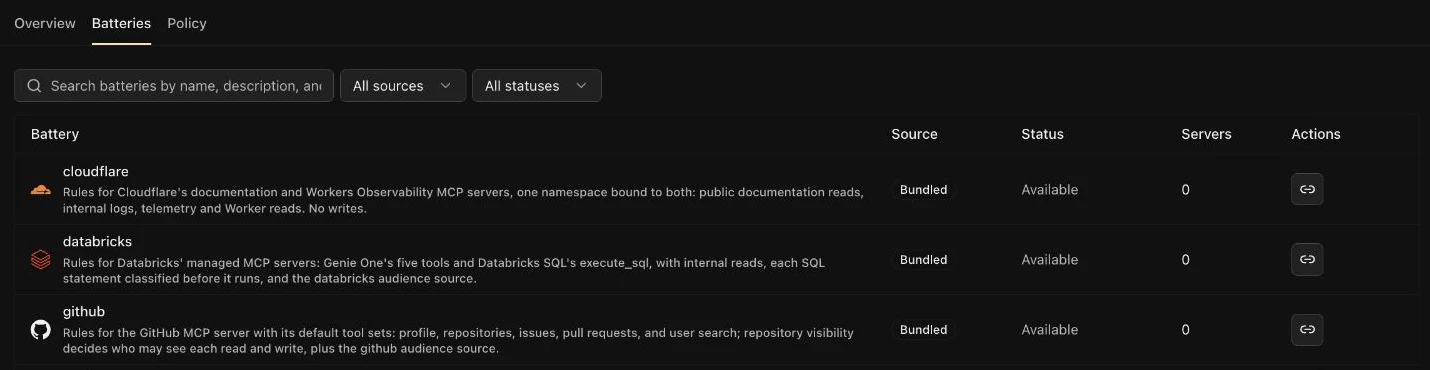
Some batteries call the provider and need a credential. Batteries with scripts need the code execution sandbox. Until a battery has what it needs, it shows as broken.
See the available batteries, or write your own.
Policy TOML
Under the hood, the policy is a TOML file, organization.appa.toml. The Policy tab shows it and the batteries it includes. It's read-only — change it through the chat or a pull request.
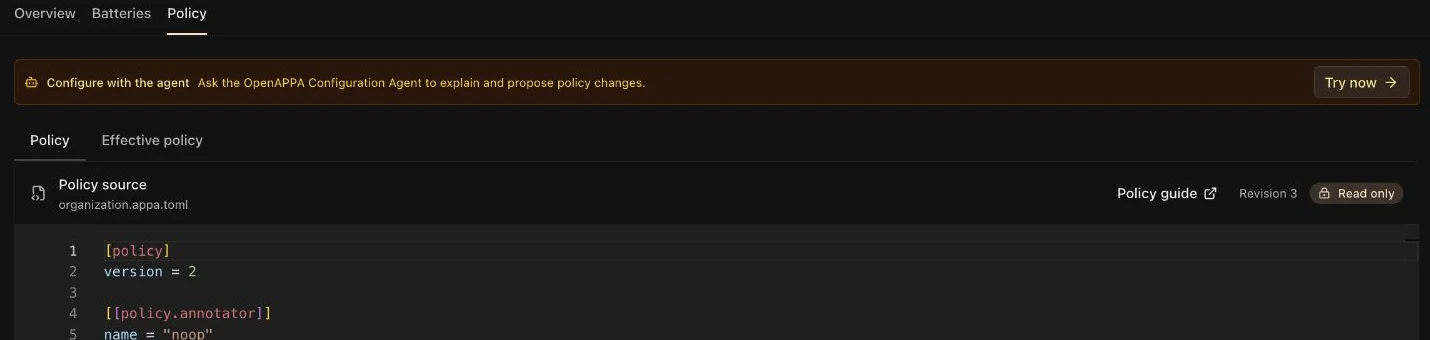
The Effective policy tab shows what's actually enforced: your file plus its batteries. Check it after a change — it flags any battery that failed to load.
Changes apply to new conversations; running ones keep their policy. See the policy reference for every field.