
Knowledge Settings
Admins tune search for every Knowledge Base under Settings → Knowledge. Only the embedding model is required.
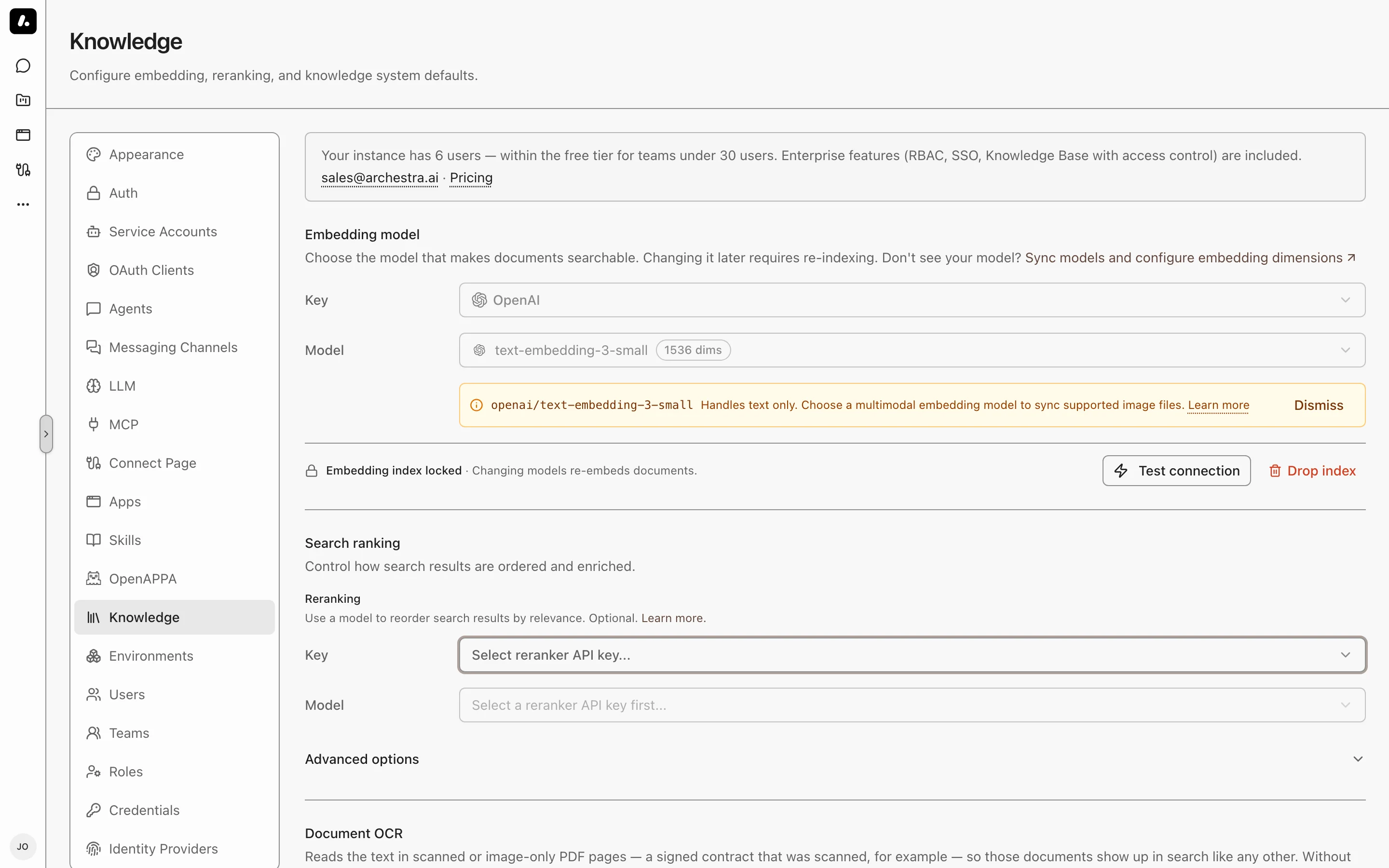
| Setting | Required | What it does |
|---|---|---|
| Embedding model | Yes | Turns passages into numbers that search compares. |
| Search ranking | No | Puts the best passages first. |
| Contextual retrieval | No | Finds passages whose subject is named elsewhere in the document. |
| Document OCR | No | Makes scanned PDFs searchable. |
| Available connectors | No | Hides the sources your company does not use from Create Connector. Existing connectors of a hidden type keep syncing. |
Embedding Model
Required. It turns every passage into numbers that search compares.
- Pick an API key and an embedding model. Subscription sign-ins do not work here.
- Click Test connection, then save.
A model is missing? Sync its provider's models under LLM Providers → Models. Then check the model's modalities: they decide which models you can pick here. Set the model's dimensions there too. Supported dimensions are 384, 768, 1024, 1408, 1536, and 3072.
Changing the Model
After you save, the model is locked, because indexing and search must use the same model. To change it, click Drop index.
- Drop index clears the model and the whole index.
- Later syncs embed every document again.
Image Embedding
Standalone images are searchable only when the embedding model accepts images.
- The model's modalities decide which formats work. Other images are skipped.
- A text-only model can still search scanned PDFs through Document OCR.
Search Ranking
A reranker reads the top passages and puts the best answers first. Without one, search still combines meaning and keyword results.
- Pick a chat model or a supported Cohere Rerank model. A chat model must return structured JSON.
- Click Test connection, then save.
Keyword Settings
Under Advanced options, two keyword settings change the next search, with no reindex:
| Setting | Default | Change it when |
|---|---|---|
| Term Saturation | 1.2 | Lower it when long, repetitive text crowds out short answers. |
| Length Normalization | 0.75 | Raise it to favor shorter passages. |
Contextual Retrieval
Finds a passage whose subject is named only elsewhere in the document. Example: a step says "restart it", under a heading that names the service.
Archestra writes a short context for each passage and matches on it. The agent still reads the original passage.
Under Search ranking → Advanced options, pick a mode:
| Mode | Use it when |
|---|---|
| Disabled | You do not need it. |
| Per document | You want lower cost. |
| Per passage | You want more precise context. |
- It needs a chat reranker. Cohere Rerank models cannot write context.
- To apply it to documents already indexed, use Force Re-sync on each connector.
Document OCR
Makes scanned PDFs searchable. A vision model reads each PDF page that has no text layer. OCR does not read standalone image files.
- Pick an API key and a vision model that accepts PDF input.
- Click Test connection. It sends a test PDF page to the model.
- Save. The first save resets each connector's checkpoint, so the next sync reads PDFs it skipped before.
Before you turn it on:
- Cost: each page is a model call, and the provider charges for it.
- Page limit: at most 100 pages per document, by default. Change it with
ARCHESTRA_KNOWLEDGE_BASE_OCR_MAX_PAGES_PER_DOCUMENT. The run details show the pages left unread. - Self-hosted model missing? Set its input types under LLM Providers → Models.