
Skills
Reusable SKILL.md instruction sets that agents load on demand
Agent Skills are markdown instruction sets an agent loads on demand. A skill is a SKILL.md file plus optional resource files, following the Agent Skills specification.
This keeps specialized knowledge out of every system prompt. Write the steps for parsing a PDF or drafting a release note once; any agent in the org can pull it in mid-chat and pay the token cost only when the skill actually runs.
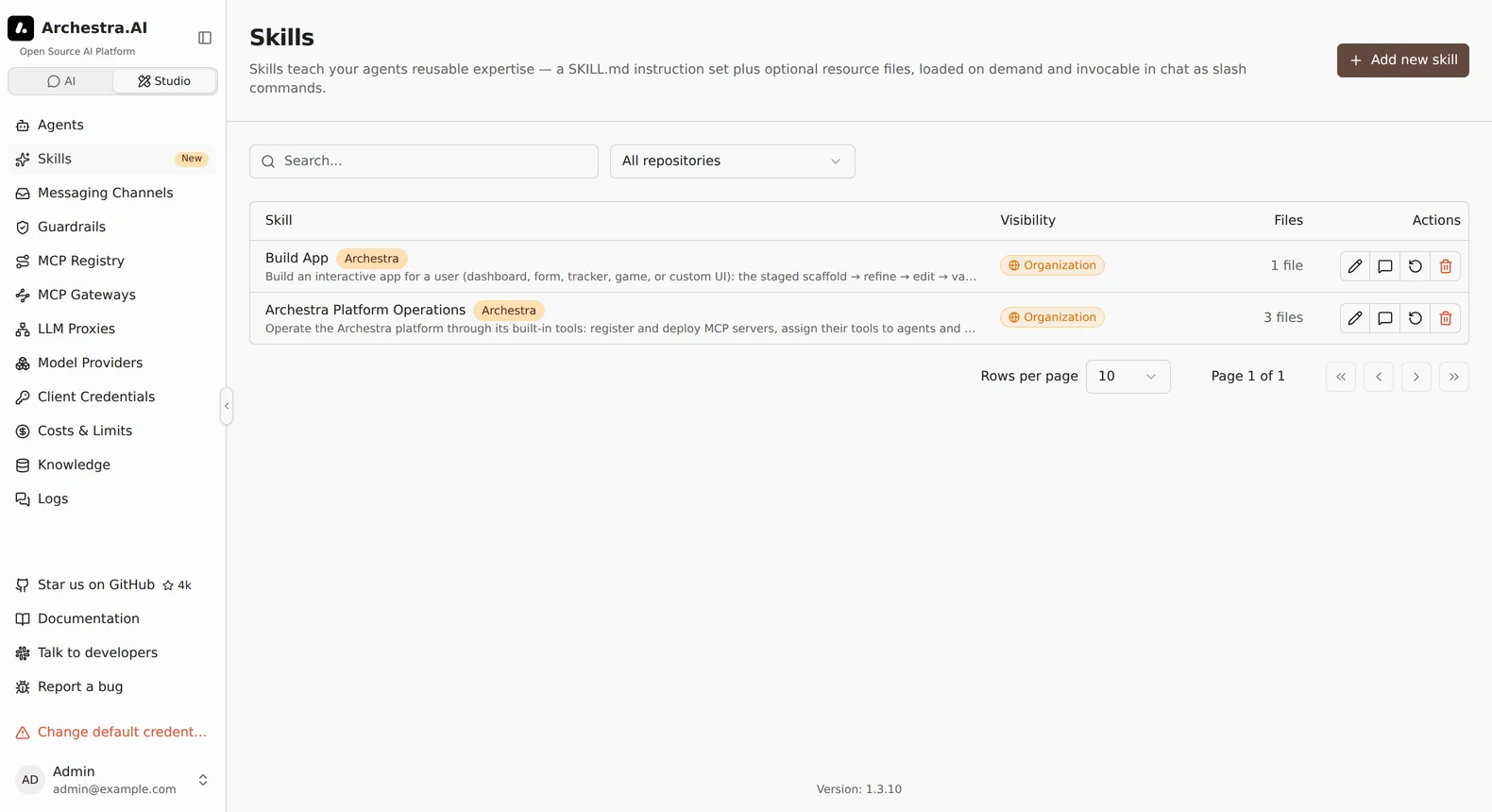
Skills live under Studio in the sidebar. The page lists skills you can read, with their source repository, file count, and use count. Filter by source repository. Permission grants control who can read, use, edit, delete, and share each skill. Every activation — a load_skill call, a slash command, or a delegated run — counts one use. The list shows the most-used skills first, so you can see which skills your organization actually relies on.
Click a skill's use count (or its chart action) to open usage analytics. It shows the last 30 days of activations as a daily chart, broken down by who ran the skill.
Ownership
You can transfer a skill to another organization member. Its files, versions, sharing, and source configuration stay intact. Built-in skills remain managed by the platform.
Progressive disclosure via two tools
Skills are off until an admin enables them for the organization. Enabling assigns list_skills and load_skill to every existing agent and to every agent created afterwards, and exposes the tools on each agent's MCP gateway so external clients see them too. Any tool can still be dropped from an individual agent's tool picker.
The two tools reveal a skill progressively:
list_skillsreturns the catalog — one line per skill (name+description).load_skillwith a name returns that skill'sSKILL.mdand the list of bundled resource paths.load_skillwith a name and a resource path fetches one bundled file at a time.
Running a skill's scripts. With the Code Sandbox enabled,
load_skillmounts the skill into the conversation's sandbox at/skills/<name>, so its scripts run right there. Without the sandbox, Archestra still stores and serves skill files intact —load_skillreturns scripts as text and binaries as base64 — so external clients with their own runtime (Claude Code, n8n, and the like) can pull them down and run them.
Invoking a skill from chat
Progressive disclosure leaves the choice to the model. When the user already knows which skill they want, enable skill slash commands — a separate organization toggle on the Skills page — and every skill becomes a /skill-name command in the chat input.
Typing / lists the available skills. Picking one, for example /pdf-to-markdown convert this report, activates that skill and sends the rest of the line as the prompt. The prompt is optional — /pdf-to-markdown on its own activates a skill meant to run as-is. The skill's SKILL.md is injected directly into that turn, so the model follows it without first calling load_skill. Slash commands build on the skill tools, so the toggle is locked until skills are enabled for the organization.
Writing a skill
Add new skill on the Skills page asks for a source, then opens the skill form: the name and description, the SKILL.md and any resource files, and who can use the skill. It is one page — everything a skill has, in the order you fill it in. Creating it takes you to the skill's own page. Picking a GitHub repo instead hands over to the import dialog described below.
Every skill has a page of its own, and that page is the form you just filled in. Change the name, the instructions, the files, or who can use the skill, then Save — there is no separate edit screen to open. Discard changes puts the skill back the way you found it. Usage is a tab beside the settings; version history, chat, and delete sit in the page header.
A skill is a SKILL.md plus optional resource files.
skill-name/
├── SKILL.md          # required: frontmatter + instructions
├── references/       # optional: docs the model reads on demand
├── scripts/          # optional: code, runnable in the code sandbox
└── assets/           # optional: templates, images, fonts
Names have to be unique in the organization — that is the key load_skill looks up.
---
name: pdf-to-markdown
description: Extract text from a PDF and convert it to clean markdown.
compatibility: Requires python 3.10+ with pdfplumber installed.
---

# PDF to Markdown

When the user asks to convert a PDF:

1. Read `references/HEURISTICS.md` for column-detection rules.
2. Run `scripts/extract.py <path>` to get the raw text.
3. Apply the cleanup steps below before returning the result.
Paired with that you would upload references/HEURISTICS.md and scripts/extract.py as resource files; both show up in the <skill_resources> list when the skill is loaded and load on demand through load_skill with a path.
Authoring skills from chat
Skills do not have to be written in the UI. The create_skill and update_skill tools let an agent author them during a conversation: describe the skill you want, the model drafts the SKILL.md and any bundled files, then persists it. The result is immediately in the catalog and usable as a slash command.
A skill created from chat is personal to its author — sharing it with a team or the whole organization stays a deliberate action in the skill editor. create_skill needs skill:create; update_skill needs skill:update and only applies to skills the user is allowed to manage, keeping the skill's current scope. update_skill replaces a skill's entire bundled file set in one call — there is no per-file patch, so changing one resource file means re-sending all of them.
Importing from GitHub
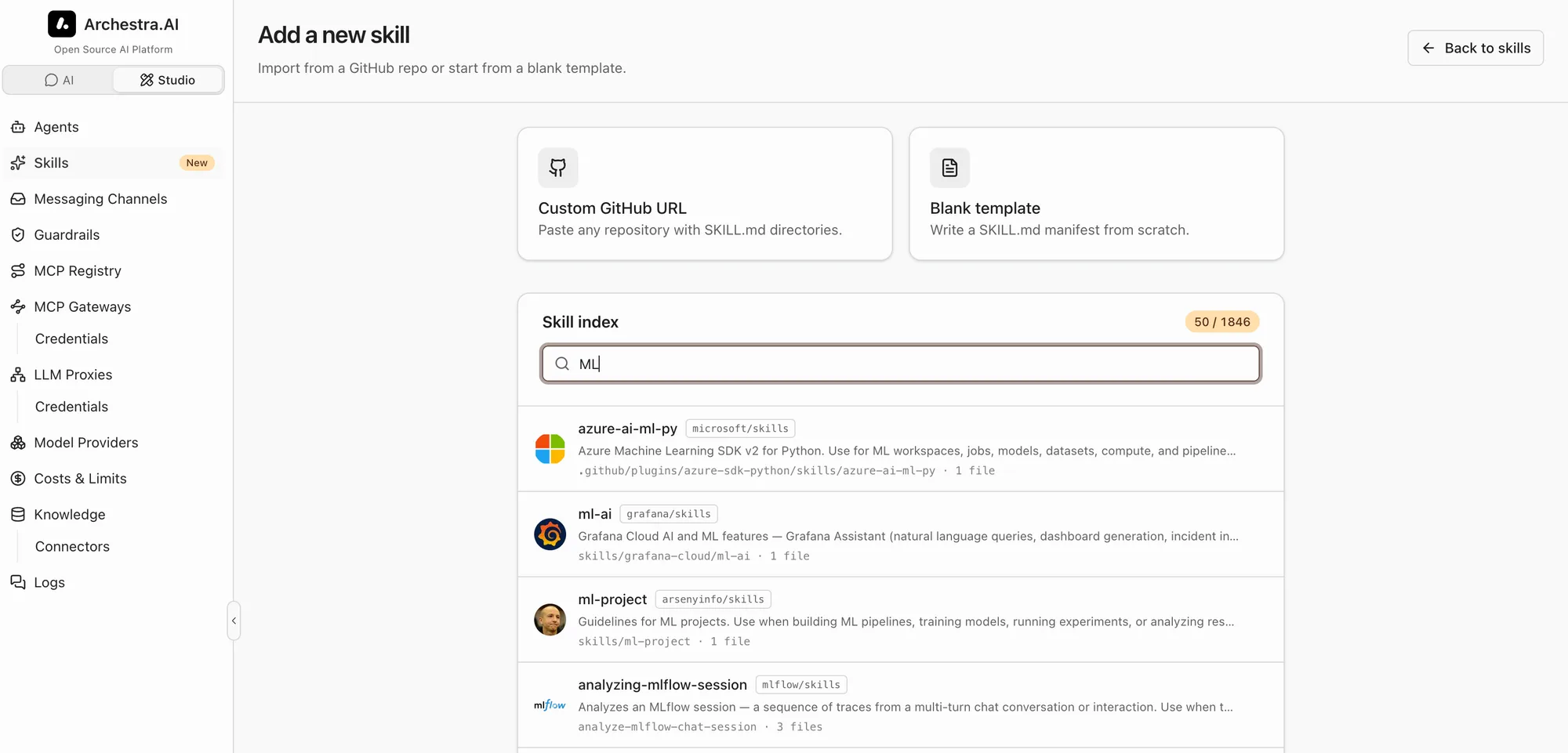
Paste a repository URL. Any of these work: owner/repo, a full https URL, or a tree/<branch>/<path> deep link. For private repos, use a saved token or GitHub App from Settings → Credentials, or paste a token — it is saved there on import.
Enterprise repositories require a GitHub App configured for that host in Settings → Credentials. For GitHub Enterprise Server, use its API URL, such as https://git.example.com/api/v3. Paste the repository's full URL and select that App when importing. Imports and scheduled syncs use the configured Enterprise API. Saved tokens and anonymous imports support github.com.
For anything bigger than a small repo, narrow the scan with the path field and supply a GitHub token. Archestra walks the whole tree by default, and anonymous GitHub calls share a 60-requests/hour limit — discovery on a large monorepo is slow without a path and will rate-limit without a token.
Every directory with a SKILL.md shows up in the result; pick which ones to import — it is not all-or-nothing. Importing many skills at once, or skills with many resource files, can take a while: each file is fetched sequentially.
The permissions chosen during import apply to every skill in the batch. You receive full access. Existing resource-wide grants also apply.
Each import records the source (owner/repo@ref:path) and the resolved commit SHA, so you can later filter the catalog by repo and see exactly which revision landed.
Sync
Every import stays synced with the repository. Keep in sync in the dialog picks the schedule for the batch — every 15 minutes, every hour, or once a day (the default). Synced skills carry a synced badge in the list. Their SKILL.md and files are read-only in Archestra; the repository is the place to edit them. Permissions and environments stay editable. A failed pull keeps the last good content and shows the error in the editor.
Stop syncing in the skill editor breaks the link: the skill keeps its current content, becomes editable, and stops updating. Sync now pulls immediately instead of waiting for the schedule.
Sync authenticates with a saved personal access token or a GitHub App configuration — both managed under Settings → Credentials — or not at all (public repos). A token pasted in the import dialog is saved there on import, so scheduled pulls stay authenticated.
A few behaviors worth knowing:
- One snapshot per session. The repo tree is cached for five minutes, so what you previewed is what you import even if upstream moves in between.
- Per-file 10 MB cap, 500 files per skill. Binary assets are preserved (base64-encoded), so images and fonts round-trip.
Turning the Online Catalog Off
Settings → Skills → Online skill catalog controls whether people can reach the public catalog at all. Turning it off removes the source step, so Add new skill opens the blank form directly.
The setting is enforced on the server, not just in the wizard. Catalog search and the GitHub discover, preview, and import endpoints all refuse the request, so a script or an agent calling the API directly gets the same answer as the UI.
Writing skills by hand stays available — in the editor, and through the create_skill and update_skill tools. Skills imported before the setting was turned off keep their content and keep syncing from their repository; stop a skill's sync in its editor to break that link.
Skills from MCP servers
Beta feature — set
ARCHESTRA_MCP_SKILLS_ENABLED=true(or enable the masterARCHESTRA_BETAswitch). See Deployment.
Skills over MCP let MCP servers publish reusable, task-focused instructions and supporting resources alongside their tools. In Archestra, Skills offered by server installations you can access appear on the Skills page, where you can inspect them, review their usage, or start a Chat with that Skill attached to your next message. They are intended for service-owned playbooks and workflows that should remain managed by the MCP server rather than be recreated as standalone Archestra Skills. The integration follows the draft io.modelcontextprotocol/skills extension in SEP-2640; see the rendered specification and the official Skills Over MCP working group for details.
Skills from plugins
Beta feature — set
ARCHESTRA_PLUGINS_ENABLED=true, or enable theARCHESTRA_BETAswitch. See Deployment.
Plugins can contain one or more SKILL.md trees. Every valid Skill inside a plugin you can access appears in the Skills from plugins category.
The category does not filter by the plugin's client or operating system. Skill instructions are usually portable, so a Skill from a Claude Code plugin can still help in another client. The source client and platforms stay visible because bundled scripts and tool names may depend on them.
Plugin Skills are read-only and remain managed by their source plugin. Archestra shares every file owned by the Skill tree except hooks, hook manifests, plugin or marketplace metadata, and installation files. Anyone with access can load the remaining files through the same list_skills and load_skill tools as other Skills. Activations contribute to the shared usage view. Archestra reads the source bytes directly instead of copying them into standalone Skills.
list_skills keeps each source Skill's name when it is unique. Name collisions add -from-mcp or -from-plugin; pass the returned name to load_skill.
Permissions
Skills use resource permission grants. Read access supports discovery. Use access permits loading or activating a skill. Update, delete, and managing permissions are separate actions.
You can grant access to users, teams, service accounts, roles, or everyone. Creating a skill requires skill:create. Creators receive full access to the new skill. Existing resource-wide grants also apply.
Automatic gateway publication includes skills with organization-wide use access. Manual publication requires permission to manage the skill’s access, or organization-wide use access. Published skills are available to everyone using that gateway. Removing an assignment stops manual publication.
Deleting and Restoring Skills
Deleting a skill hides it from every list, activation, slash command, and share link. It also stops the skill's GitHub sync. The skill is not destroyed — it moves to a trash. Its name is free to reuse right away, so you can create a new skill with that name.
Admins and team admins switch the status filter to Deleted to open the trash. Restore returns the skill to active. A restore is refused when an active skill already holds the name — rename or delete that one, then restore again.
Global admins can also delete a skill from the trash for good, with Delete permanently. This destroys the skill, every version, and every file it holds. Nothing brings it back. A skill mounted in a code sandbox is refused until that sandbox is gone.
Deleting a built-in skill is a lasting opt-out — it stays gone across restarts. You can still restore it from the trash. Built-in skills cannot be deleted for good, since the trash record is what keeps them from coming back.
A synced skill can lose its GitHub token while it sits in the trash. It still restores, but the next pull runs unauthenticated — for a now-private repo that fails with a sync error. Re-attach a token under Settings → Credentials to fix it.
Version History
Every edit that changes a skill's SKILL.md or resource files creates a new immutable version. An edit that changes nothing does not. Version numbers count up from 1, and the full history is kept.
Open Version history from the actions on a skill's row to browse them. Pick a version to read its files. You can read them whole, or as a diff against the version before it.
A version pulled from GitHub links out to that skill's directory at the commit it came from, so you can read the change upstream. Versions you author here have no link.
GET /api/skills/:id/versions lists versions as metadata, newest first. GET /api/skills/:id/versions/:version returns one version's body and file snapshots. Sandboxes mount a pinned version, so a running skill never changes mid-conversation.
Restoring a Version
Restore this version republishes an older version's content. It creates a new version instead of rewinding, so the history is never rewritten.
A restore replaces the skill's instructions and its resource files. Files the skill has today that the restored version lacks are removed — the confirmation tells you how many. A later restore brings them back.
Nothing else changes. The name, description, and other frontmatter fields are not versioned. Neither are permissions or environments, so a restore will not undo a rename.
A GitHub-synced skill cannot be restored, since its content comes from the repository. Stop the sync in the skill editor to make the skill editable again.
Built-in skills also offer Reset to default, next to the restore button. It overwrites your local edits with the content Archestra ships, recorded as a new version.
Concurrent Edits
The skill editor anchors each save to the version it loaded. If someone changes the skill's content first, the save is refused. Their edit is never overwritten.
PUT /api/skills/:id takes baseVersion — the skill's latestVersion when you composed the edit. The request fails with 409 if the skill has moved past it. Omit baseVersion and the save is not guarded. The edit_skill tool takes the same field.
Only content is versioned. A change to the name, permissions, or environments is not caught.
Environments
A skill can be restricted to one or more environments. A skill with no environments is available to agents in every environment. A restricted skill is only visible to agents in one of its environments — list_skills, load_skill, and slash commands are all filtered the same way. Built-in skills are visible everywhere, like built-in tools.
Pick the environments in the skill editor; leave the field empty to keep the skill available everywhere. A skill authored from chat inherits the authoring agent's environment. Restricting a skill to a restricted environment requires a use grant on that environment.
Running a Skill in a Subagent
A skill can name an agent in its frontmatter:
---
name: deep-research
description: Multi-step research with citations.
agent: Research Bot
---
Such a skill runs in that agent instead of loading its instructions into the calling agent's context. The skill surfaces as a skill__deep_research tool; calling it sends the skill's instructions plus the task to Research Bot, which executes with its own tools and returns the result. A slash command on the skill does the same — the model is told to call the tool rather than receiving the instructions.
This keeps the parent conversation's context clean and pairs a skill with the agent whose tools it needs. The designated agent must be in the same environment as the calling agent, and the calling user must have access to it — the same rules as delegation. Skill delegation needs a signed-in user; automated runs (a scheduled trigger, for example) cannot use it.
Compatibility
Some skills only work in specific environments — a Python interpreter, a particular OS, a tool that has to be installed first. The spec captures that as a compatibility field in the frontmatter. Archestra shows it as a compatibility badge in the skill list and import dialog, and includes the value in the load_skill response so the model can tell the user when the environment cannot meet the requirement instead of failing halfway through the task.
Distribution to external clients
The two skill tools are plain MCP tools. Any external client — Claude Code, Cursor, Codex, n8n — that connects to an agent's MCP gateway sees them alongside the rest of that agent's tools and gets the same progressive-disclosure flow. A skill authored once in Archestra is reachable from everywhere the agent is plugged in, with no SKILL.md copies to keep in sync. To hand skills to a client as portable bundles instead, see Sharing Skills. A gateway can also publish skills as skill:// resources, which a client lists alongside its own skills — see Publishing Skills over MCP.
Skills vs Agents
We recommend using Skills as default way of customizing agentic workloads.
| Primitive | What it is | When to use |
|---|---|---|
| Agent | System prompt + tools + knowledge | Default building block |
| Sub-agent | Agent called by another agent as a helper | Compose specialists under one orchestrator |
| Skill | Markdown + scripts loaded on demand via load_skill | Keep agents generic; attach many specializations |