
Limits
Set budgets and rate limits in Costs & Limits → Limits so a busy key, runaway agent loop, or shared credential stops when it hits its allowance instead of running up your provider bill. Viewing limits requires llmLimit:read; creating, editing, or deleting limits requires llmLimit:create, llmLimit:update, or llmLimit:delete.
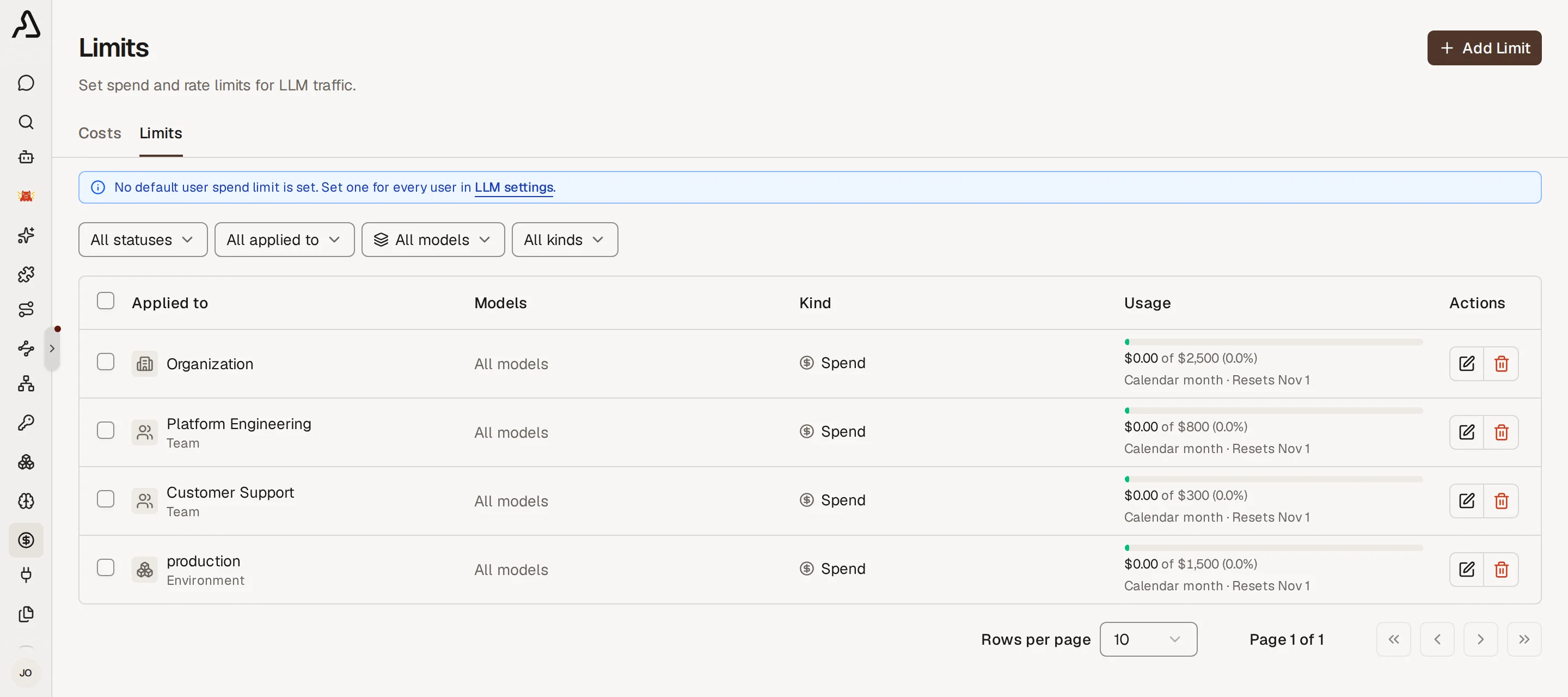
Create a Limit
- Go to Costs & Limits → Limits and click Create limit.
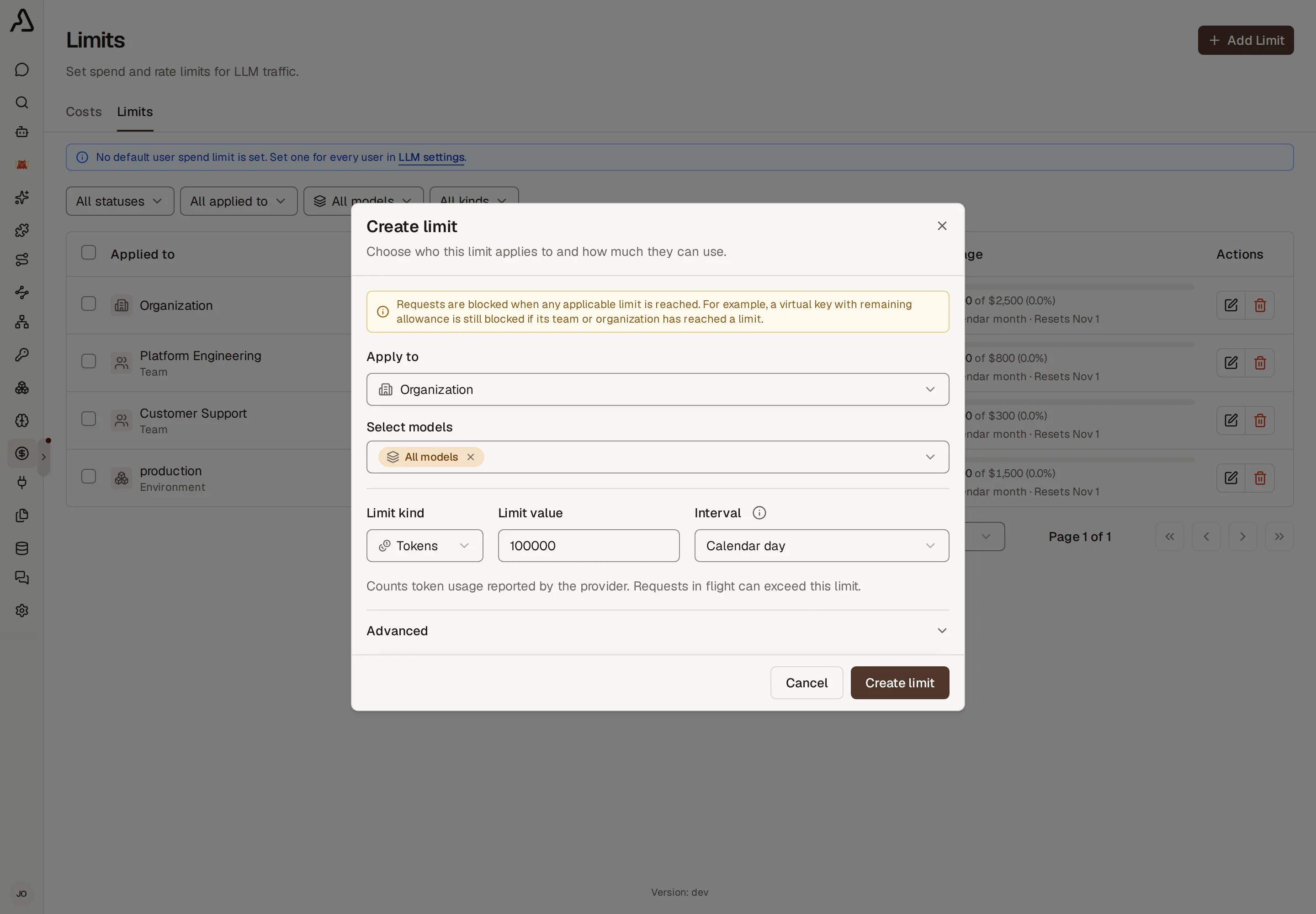
- Under Apply to, choose the scope (Organization, Team, Virtual key, User, Agent, LLM OAuth client, or Environment) and select the target entity.
- Under Select models, keep All models so every model shares one pool, or pick specific models to cap only those models.
- Enter a whole-number Limit value, choose the Limit kind (Spend, Tokens, or Requests), and pick the reset Interval.
- Optionally expand Labels to tag the rule for filtering, then click Create limit.
Scopes and Limit Kinds
Organization, Team, and Virtual key scopes support all three limit kinds, including per-minute rate limits. User, Agent, LLM OAuth client, and Environment scopes support Spend limits on hourly, multi-hour, weekly, monthly, and calendar intervals.
| Scope | Spend ($) | Tokens | Requests |
|---|---|---|---|
| Organization, Team, Virtual key | Rolling (1h–1m) and calendar intervals | Per minute, plus all rolling and calendar intervals | Per minute, plus all rolling and calendar intervals |
| User, Agent, LLM OAuth client, Environment | Rolling (1h–1m) and calendar intervals | — | — |
When more than one rule matches a call, every matching rule is checked:
- Every matching scope must allow the request. A virtual key with remaining allowance is still blocked if its billing team or the organization has reached its cap.
- Model-specific and all-models rules both apply. A call to
claude-sonnet-4-6checks both any rule targetingclaude-sonnet-4-6and any rule set to All models on the same scope. - Multi-model rules share one pool. Selecting multiple models on a single rule caps their combined spend, tokens, or requests together.
Reset Intervals
Each limit resets or recovers according to its Interval:
| Family | Options | How it resets |
|---|---|---|
| Per minute | Per minute (Tokens and Requests on Organization, Team, or Virtual key) | Allows bursts up to the limit value and recovers continuously over 60 seconds (for example, 60 requests per minute recovers 1 request per second). |
| Rolling | Every hour, Every 12 hours, Every 24 hours, Every week, Every month | Resets once the full interval has elapsed since the previous reset. |
| Calendar | Calendar day, Calendar week (Sun), Calendar week (Mon), Calendar month | Resets at 00:00 local server time at the start of the next day, Sunday, Monday, or month. |
Default User Spend Limits
Instead of creating a separate rule for each person, go to Settings → LLM and set Default User Spend Limit with a dollar amount and reset interval. Every user gets their own individual spend allowance of that size.
- Override for one user: create a User spend limit in Costs & Limits → Limits. That custom rule replaces the default user spend limit for the selected person.
- Override for an environment: set a default user spend limit on an Environment to give users in that environment a different default cap.
How Usage Is Counted
- Spend (
$): counts metered API-key calls at the model's token prices. Calls on flat-rate subscriptions record$0spend and do not consume spend limits (see Subscription vs Metered Cost). - Tokens: counts newly processed input and output tokens reported by the provider after each call finishes (including cache writes and subscription traffic; reused cached input does not consume token limits). Because token counts arrive when a response completes, requests already in flight can push usage slightly past a token limit before subsequent requests are blocked.
- Requests: counts one request when the proxy admits a model call, including subscription traffic.
When a Request Is Blocked
When any matching rule is exhausted, the proxy rejects the call before forwarding it upstream:
| Limit reached | HTTP status | Error code | Details |
|---|---|---|---|
| Spend | 402 Payment Required | token_cost_limit_exceeded | Returned when any matching spend limit has reached 100%. |
| Tokens or Requests | 429 Too Many Requests | archestra_quota_exceeded | Includes a Retry-After header (in seconds) indicating when enough allowance recovers or resets. |