
Plugins
Client-native extensions delivered to Claude Code, Codex, Copilot CLI, and Cursor
Plugins package client-native behavior for coding agents. A plugin can contain hooks, agents, commands, skills, MCP configuration, and companion scripts.
Plugins run on developer machines. Review every file before you approve an import or update.
Beta feature — set
ARCHESTRA_PLUGINS_ENABLED=true, or enable theARCHESTRA_BETAswitch. See Deployment.
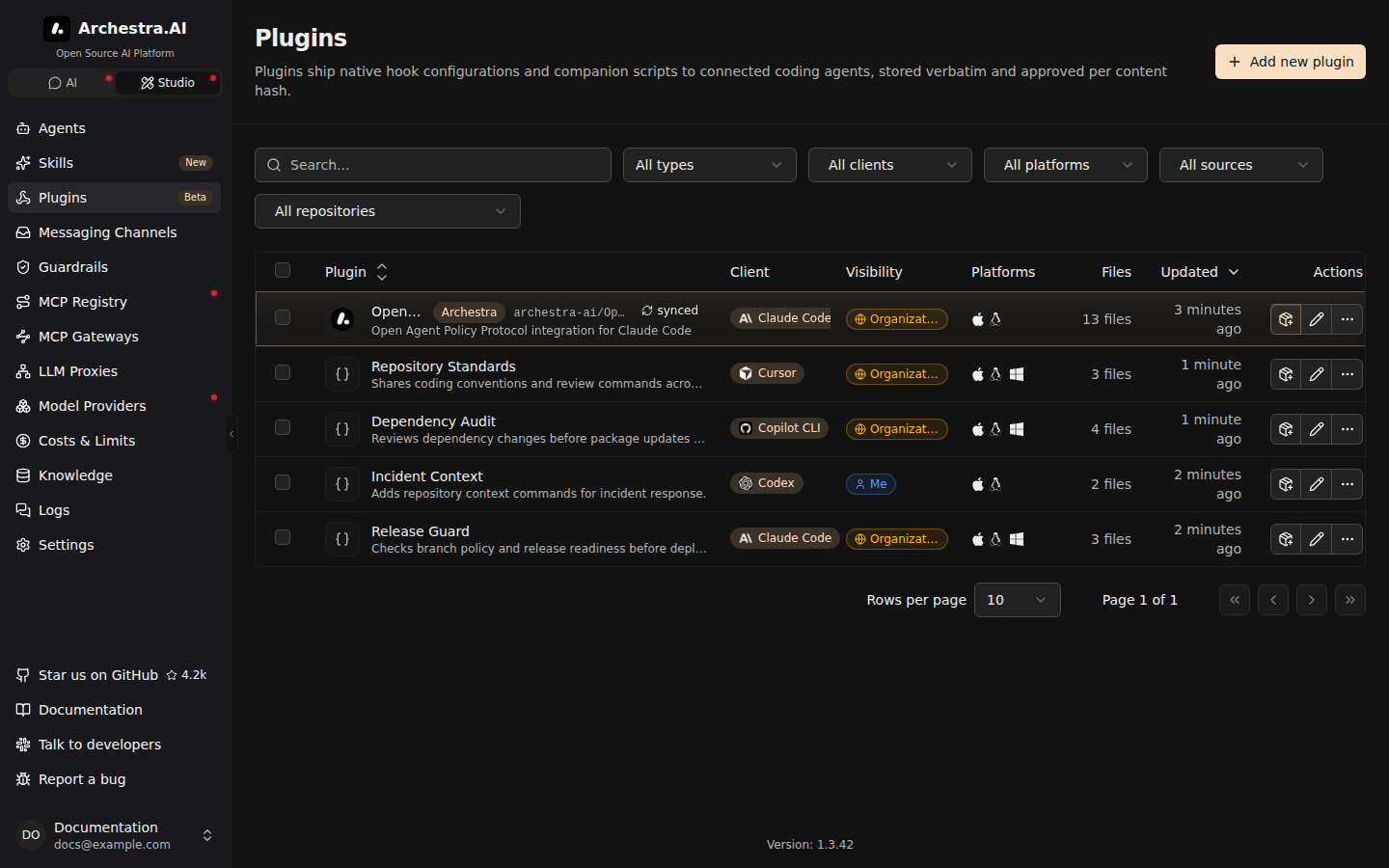
Plugins live under Studio in the sidebar. The catalog shows each plugin's client, platform support, source, visibility, and sync state.
Creating a Plugin
Add new plugin opens a three-step wizard. Choose a source, review the files, then set visibility.
A blank plugin starts with hooks/hooks.json. Hooks are optional. You can replace that file with any payload the target client supports.
Every plugin targets one client:
- Claude Code
- Codex
- Copilot CLI
- Cursor
It also declares support for macOS/Linux, Windows, or both. This prevents a setup command from installing an incompatible payload.
Archestra stores plugin files without translating them. Imported executable modes are preserved. Files such as .mcp.json remain part of the plugin when the client supports them.
Importing a Marketplace
You can import from a popular marketplace or paste another GitHub marketplace URL. Private repositories use a saved GitHub App or personal access token from Settings → GitHub.
Discovery lists the marketplace entries before anything is imported. Select the plugins you want and preview their files.
Each import accepts up to 10 plugins. Reopen the marketplace to import the next batch.
An import pins the marketplace revision and each selected source commit. If a source moves during review, the import stops instead of substituting different files.
GitHub-owned files stay read-only in Archestra. Edit them in their repository.
Reviewing Updates
GitHub checks can run manually, every 15 minutes, every hour, or once a day. A changed commit becomes an update candidate.
An update never replaces approved files automatically. Open Updates, review the candidate, then approve and apply it.
OpenAPPA is imported once for each organization when Plugins are enabled. It behaves like any other GitHub plugin after import. You can update or delete it.
Installing Plugins
You can install one plugin from its details page. Select several compatible rows to generate one command for the batch.
Bulk installation requires one client and a platform shared by every selected plugin.
The Connection page can install plugins alongside the MCP gateway, LLM proxy, and shared Skills. The review step freezes the exact plugin selection into a one-time command.
| Client | Installation |
|---|---|
| Claude Code | Registers the marketplace and installs each selected plugin. |
| Codex | Installs each plugin. Open /hooks to approve delivered hooks before they run. |
| Copilot CLI | Registers the marketplace and installs each selected plugin. |
| Cursor | Registers the marketplace, then lists the plugins to install from Customize → Plugins. |
Plugin-only commands leave MCP and proxy configuration unchanged.
Visibility And Permissions
Visibility controls who can discover a plugin:
- Personal — the owner and explicitly shared users.
- Team — members of the selected teams.
- Organization — everyone in the organization.
Every plugin action requires plugin:admin plus its action-specific permission. See Access Control for the complete reference.
Disabling a plugin removes it from future setup commands and marketplace revisions. Deleting it also stops GitHub checks.
Neither action removes code already installed on a developer machine. Uninstall it with the client or the startup guard.
Use Case: Custom Hook Bundle
A platform team keeps its coding-agent policy in one GitHub repository:
developer-policy/
├── hooks/hooks.json
├── scripts/check-branch.sh
└── scripts/check-branch.ps1
The team imports the marketplace entry and reviews the pinned files. It marks both platforms as supported after testing each script.
An authorized platform administrator selects the plugin and runs the setup command. A later GitHub change appears as a review candidate before it reaches another machine.
Plugins, Skills, And Hooks
| Primitive | What it does |
|---|---|
| Plugin | Installs client-native files and behavior on a developer machine. |
| Skill | Gives an agent instructions and resources to load on demand. |
| Archestra hook | Runs a script in Archestra's sandbox during an agent lifecycle event. |
Use a plugin when the coding client must own the behavior. Use a Skill when the model needs reusable guidance.