
Webhook (A2A)
Run an agent from your own code. Every agent has an HTTP endpoint. Send it a message, and read the reply. It speaks A2A 1.0, so A2A SDKs and other agent platforms work too.
To start, open the agent's A2A tab. It shows the endpoint, your token, and curl examples for that agent.
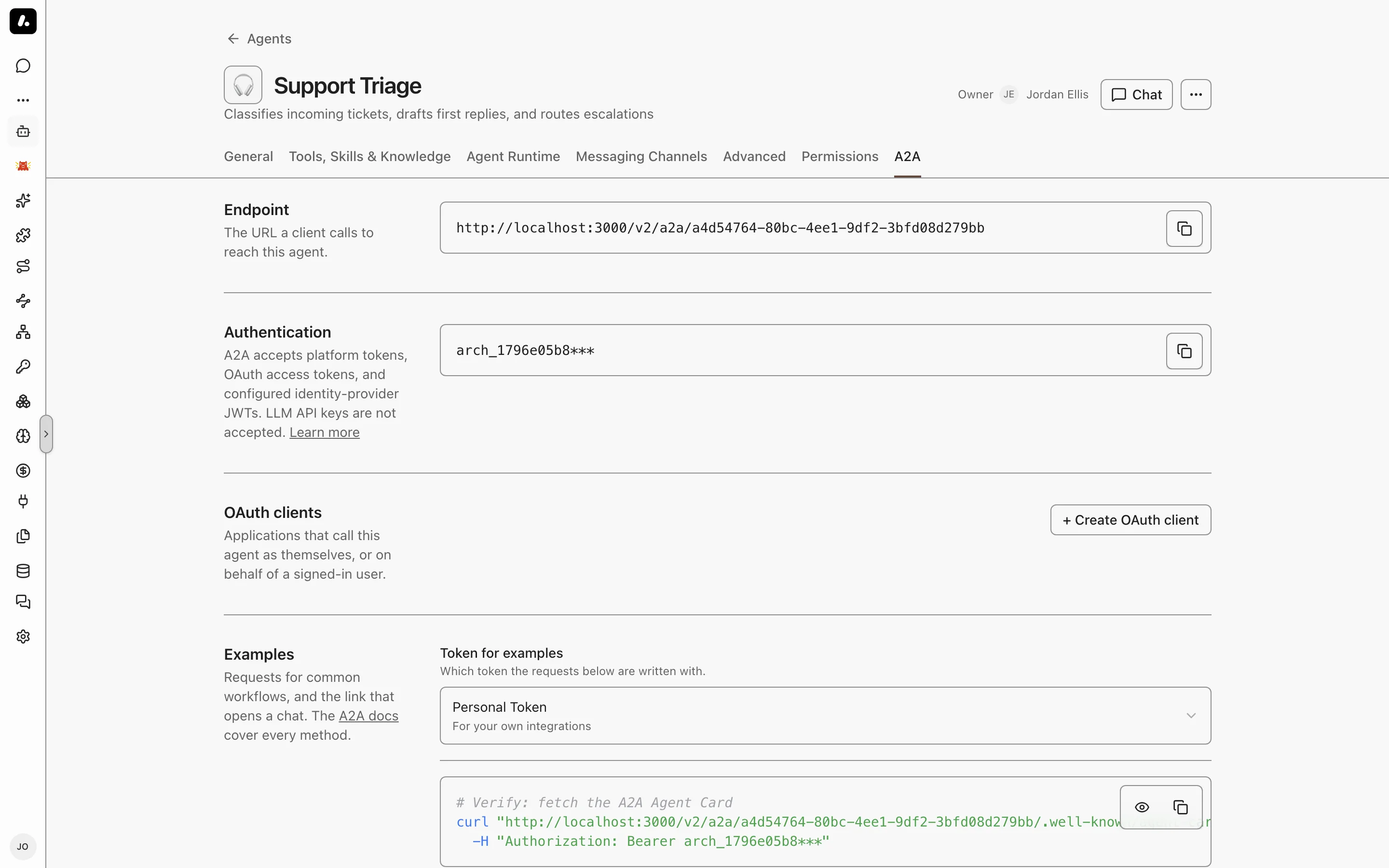
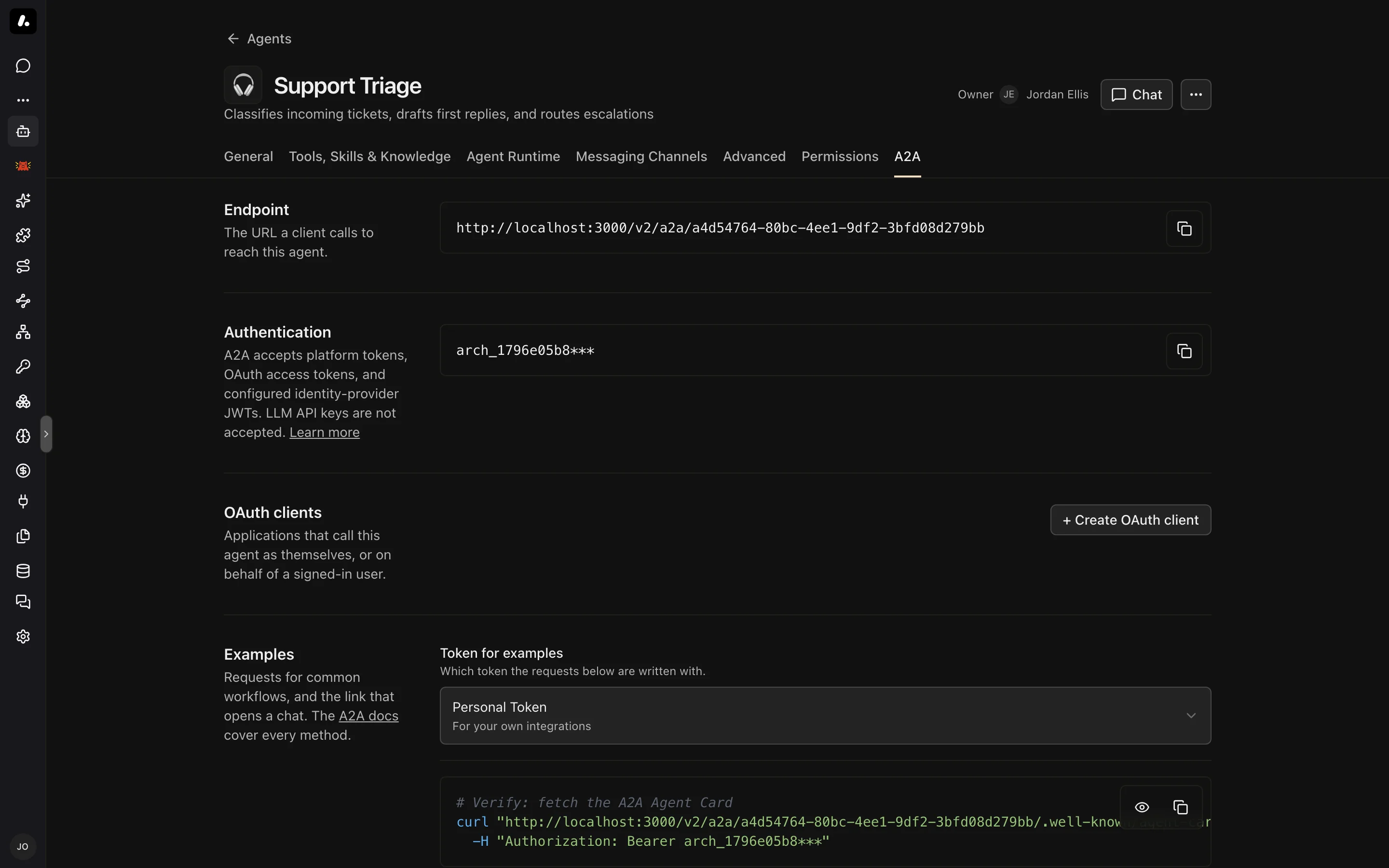
Endpoints
| Method | Path | Purpose |
|---|---|---|
POST | /v2/a2a/{agentId} | Send messages and manage tasks (JSON-RPC) |
GET | /v2/a2a/{agentId}/.well-known/agent-card.json | The agent's AgentCard: name, description, and capabilities |
GET | /v2/a2a/agents | The AgentCards of every agent your token can reach |
Give clients the full AgentCard URL. The card lives under each agent, not at the domain root. A request to /.well-known/agent-card.json on the host gets a 401, which looks like a token problem.
Authentication
Send a bearer token in the Authorization header of every request. A2A takes the same tokens as the MCP Gateway:
| Credential | Where to get it | Runs as |
|---|---|---|
| Personal token | Click your name in the sidebar to open Personal Settings | You |
| Team token | Settings → Teams, then the team's token | The team |
| Organization token | Settings → Auth | The organization |
| OAuth access token | An OAuth client that lists the agent | The client, or the signed-in user |
| Identity provider JWT | Bind the agent to an identity provider | The user in the JWT |
What to know:
- A token reaches only the agents its owner can use. See Access Control.
- LLM API keys and virtual keys do not work here.
GET /v2/a2a/agentstakes platform tokens only.
Sending a Message
SendMessage runs one turn and waits for the reply:
curl -X POST "https://archestra.example.com/v2/a2a/<agentId>" \
  -H "Authorization: Bearer <token>" \
  -H "Content-Type: application/json" \
  -d '{
    "jsonrpc": "2.0",
    "id": 1,
    "method": "SendMessage",
    "params": {
      "message": {
        "role": "ROLE_USER",
        "parts": [{ "text": "Summarize yesterday'\''s open incidents." }]
      }
    }
  }'
The reply is the agent's message:
{
  "jsonrpc": "2.0",
  "id": 1,
  "result": {
    "message": {
      "role": "ROLE_AGENT",
      "contextId": "327a5306-c7dc-4e0c-ba2f-107da6c2548b",
      "parts": [{ "text": "Two incidents are open..." }]
    }
  }
}
Some calls return a task, not a message: an agent with a dedicated runtime, a tool call that needs approval, or a background run. A finished task holds the answer in its text artifact agent-response. messageId is optional.
Continuing a Conversation
Copy contextId from the first reply into the next message. The agent sees the earlier turns:
"message": {
  "role": "ROLE_USER",
  "contextId": "327a5306-c7dc-4e0c-ba2f-107da6c2548b",
  "parts": [{ "text": "Which one is oldest?" }]
}
Use only IDs that Archestra returned. Do not send taskId on a new turn, because a finished task takes no more messages.
Running in the Background
Set configuration.returnImmediately to get a task back at once instead of waiting for the answer:
"params": {
  "message": { "role": "ROLE_USER", "parts": [{ "text": "Audit every open PR." }] },
  "configuration": { "returnImmediately": true }
}
The result is a task in TASK_STATE_SUBMITTED. Poll it with GetTask until its state is TASK_STATE_COMPLETED, TASK_STATE_FAILED, or TASK_STATE_CANCELED:
{ "jsonrpc": "2.0", "id": 2, "method": "GetTask", "params": { "id": "<taskId>", "historyLength": 0 } }
historyLength: 0 leaves out the history. A failed task gives the reason in status.message. A dropped connection does not stop a task. Only CancelTask does.
Streaming
SendStreamingMessage takes the same params as SendMessage and returns a text/event-stream (use curl -N). Send the A2A-Version: 1.0 header to get the A2A 1.0 event shape:
data: {"jsonrpc":"2.0","id":1,"result":{"task":{"id":"...","status":{"state":"TASK_STATE_SUBMITTED"}}}}
data: {"jsonrpc":"2.0","id":1,"result":{"statusUpdate":{"status":{"state":"TASK_STATE_WORKING"}}}}
data: {"jsonrpc":"2.0","id":1,"result":{"artifactUpdate":{"artifact":{"name":"agent-response","parts":[{"text":"Two "}]}}}}
data: {"jsonrpc":"2.0","id":1,"result":{"statusUpdate":{"status":{"state":"TASK_STATE_COMPLETED"}}}}
What to know:
- Join the
artifactUpdatetext to build the answer. Skip lines that do not start withdata:, such as: keep-alive. - Without the header, the stream uses the older A2A 0.3 shape. It ends with a
final: truestatus update. - If the connection drops, call
SubscribeToTaskwith the taskidto join again.
Approving Tool Calls
When a tool call needs approval, the result is a task in TASK_STATE_INPUT_REQUIRED. The pending requests are in metadata.approvalRequests:
"metadata": {
  "approvalRequests": [
    { "approvalId": "appr-1", "toolName": "send_email", "approved": false, "resolved": false }
  ]
}
Answer with a SendMessage that names the task and carries a decision for each request:
"message": {
  "role": "ROLE_USER",
  "taskId": "<taskId>",
  "contextId": "<contextId>",
  "parts": [],
  "metadata": {
    "taskOps": { "approvalDecisions": [{ "approvalId": "appr-1", "approved": true }] }
  }
}
The run resumes once every request has a decision. CancelTask on a waiting task cancels it.
Other Methods
| Method | Params | What it does |
|---|---|---|
ListTasks | contextId, status, pageSize, pageToken (all optional) | Your tasks for this agent, newest first |
CancelTask | id | Stops a task |
SubscribeToTask | id | Rejoins a running task's event stream |
CreateTaskPushNotificationConfig | taskId, pushNotificationConfig.url | POSTs each status change of the task to your https URL |
Push URLs must be public https addresses. A delivery can arrive twice, so your receiver must handle repeats. Manage push configs with GetTaskPushNotificationConfig, ListTaskPushNotificationConfigs, and DeleteTaskPushNotificationConfig.
SDKs
The A2A SDKs work with /v2/a2a: a2a-python and the 1.x a2a-js for TypeScript. Point the client at the agent's AgentCard URL and pass the token as a bearer header. To let an Archestra agent call another A2A agent, see External Agents.
Plain JSON Payloads
POST /v1/a2a/{agentId} also accepts any JSON body that is not a JSON-RPC envelope, from a tool such as Zapier, for example. Archestra sends the body to the agent as text, as the user message. Each call starts a new conversation.
Troubleshooting
Errors come back with HTTP status 200 and a JSON-RPC error object. Only AgentCard and registry requests use HTTP 401.
| Error | Cause |
|---|---|
-32600 Authorization header required | No Authorization: Bearer header |
-32602 Failed to resolve actor from token | The token is invalid or cannot reach this agent |
-32601 Method not found | A method name from another A2A version, such as message/send |
-32600 Invalid Request | The params do not match the schema. data names the field, for example a role that is not ROLE_USER |
-32602 Context not found | A contextId that Archestra did not create, or that belongs to someone else |
-32004 the task is in a terminal state | A message sent to a finished task. Send contextId without taskId |
-32009 Unsupported A2A-Version | An A2A-Version header other than 0.3 or 1.0 |
-32603 Internal error | The run failed, for example at the LLM provider. data.reason has the provider's message |