
Agent Runtime (Beta)
Run delegated Agent tasks in an isolated runtime
Agent Runtime gives an Agent an isolated runtime for delegated, long-running work. It is an optional capability of the Agent, not a separate resource to create or grant access to.
Think of the configuration as three composable layers:
- The Agent is the durable identity: its instructions, selected model, tools, knowledge, environment, and access rules.
- The foreground runtime is Archestra's built-in Agent loop. It powers ordinary conversations and the full chat interface.
- The optional dedicated runtime is an isolated run selected by Archestra's control plane. The first runtime backend uses Kubernetes pods and can run Archestra Agent, Claude Code, Codex, OpenCode, Hermes, OpenClaw, or a custom image. Each task is presented as a run with logs and a live shell.
The runtime does not become a second Agent. Both runtimes act as the same Agent and receive the same platform-managed model and tool access.
Archestra owns the durable task state, identity, authorization, credentials,
model proxy, MCP gateway, logs, steering, cancellation, and completion result.
The runtime backend only supplies the isolated compute session. Runs persist
which backend started them, so a control-plane restart re-adopts work through
that same backend even if the Agent configuration changes later. This boundary
also allows VM and managed-sandbox backends to implement the same lifecycle in
the future without changing Agents, delegation, or the Runs UI.
Invocation is explicit and surface-specific:
- Archestra Chat uses run mode for an Agent with a dedicated runtime. Selecting that Agent from the composer or choosing Chat on its detail page changes the composer into a run launcher. The first message starts the isolated runtime and opens its live terminal.
- Projects use the same run launcher. Selecting an Agent with a dedicated runtime in a project's composer starts the run inside that project, where it stays grouped with the project's work.
- Ordinary messaging-channel messages stay in the foreground. A channel Agent uses the normal Archestra Agent loop unless it delegates a durable task to an Agent with a dedicated runtime.
- A2A and email select the configured runtime. An A2A
SendMessageor incoming email addressed directly to an Agent with a dedicated runtime creates a durable task there. The same calls use the foreground loop when the Agent has no Agent Runtime configuration. - Delegation selects the configured runtime. When another Agent delegates to this Agent, Archestra starts a durable task in the Agent's dedicated runtime if Agent Runtime is configured. Without it, the delegation uses the foreground Agent loop.
Agent Runtime runs have two launch modes. Chat starts the image in
interactive mode and exposes its live terminal. Maintained Claude Code,
Codex, OpenCode, Hermes, and OpenClaw images run their native TUIs in both
interactive and delegated one-shot runs. Delegation from another Agent, A2A,
incoming email, schedules, and task tools uses one-shot mode. The same
image receives the task, exits when it is finished, and lets Archestra settle
the durable task and deliver its result. This is selected by the invocation
surface, not by a user-facing Agent setting.
This lets a coordinator Agent stay responsive in a messaging channel while a specialist Agent handles durable work in its own container. It also lets a user start and supervise the same specialist directly from Chat without inventing a separate Agent or permission model.
Runtime Backend
Kubernetes is currently the only supported runtime backend. Support for additional backends is planned.
Configure Agent Runtime
An administrator must first enable Agent Runtime for the deployment. See Deployment configuration.
When enabled, Settings → Agents → Runtime Backend shows the active
backend's health and the installation-wide image, lifetime, idle, resource,
and privilege defaults. These values are read-only in the product because the
deployment operator owns them. An Agent editor only contains overrides that
belong to that Agent.
To configure an Agent:
- Open Agents and select the Agent.
- Select Edit, then open Advanced.
- Turn on Dedicated runtime.
- Review the container image and configure any command override, environment variables, run controls, or elevated permissions it needs.
- Save the Agent.
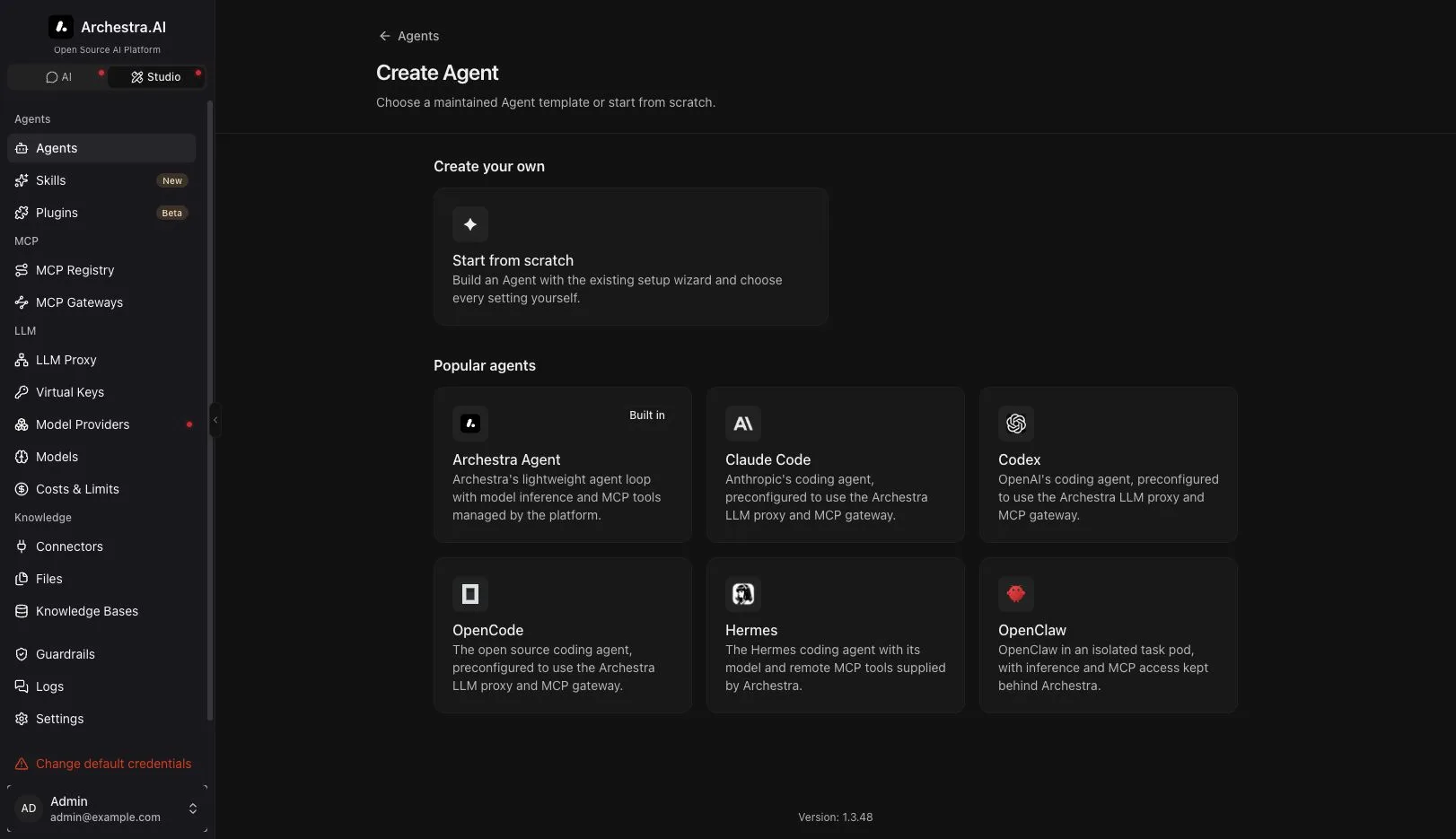
When you create an Agent, the catalog can prefill this setup for one of the
maintained images. Choose Archestra Agent, Claude Code, Codex,
OpenCode, Hermes, or OpenClaw, then review the ordinary Agent wizard. The catalog
does not create a different resource type: it supplies a name, instructions,
image, command, inference protocol, and credential declarations to the same
form used by Start from scratch.
The image field starts with the installation's default Agent Runtime image. Use a purpose-built image for the work the Agent performs. For example, a coding Agent's image can include Git, a language toolchain, and repository tooling.
Leave Command blank to use the built-in Agent loop supplied by the default image. A custom image can override the command and arguments. Agent Runtime images must include a POSIX shell and tmux, which keep the live process attachable from the Runs tab.
The dedicated runtime uses the same Agent system prompt and tool access as the foreground Agent loop. Keep the Agent's instructions focused on the specialist role you want it to perform in either mode.
Environments and network egress
Each run Job uses the Agent's Environment,
including its Kubernetes namespace and network egress policy. If the Agent has
no Environment policy override, Archestra uses the organization default policy,
then the built-in Public internet policy.
The policy is applied before Kubernetes creates the Job. Archestra emits the
policy type supported by the cluster: standard Kubernetes NetworkPolicy,
Cilium CiliumNetworkPolicy, GKE FQDNNetworkPolicy, or AWS
ApplicationNetworkPolicy. This gives runs the same IP, domain, Public
internet CIDR-exception, and floor behavior as MCP server pods and code sandboxes. DNS and the
Archestra control plane remain reachable so the run can use the LLM
proxy and MCP gateway.
See Network egress policies
for policy modes, provider support, and the fixed SSRF floor.
Built-in Archestra Agent
The Archestra Agent catalog option uses Archestra's maintained runtime
loop. It supports all three inference APIs, exposes a shell command tool rooted
in the pod workspace, loads the Agent's assigned MCP tools, applies the Agent's
system prompt, and accepts follow-up instructions at turn boundaries. It is the
default choice for custom workflows that do not require the behavior of a
specific third-party CLI.
The loop is intentionally small. Model routing, provider credentials, remote
tools, authorization, policy enforcement, limits, and audit logs stay in the
Archestra control plane.
Model inference and MCP tools
The selected Agent model remains the source of truth for Agent Runtime work. At
the start of each run, Archestra resolves that model and a provider
credential the initiating user may use, then issues a personal virtual key for
that run. The pod receives the virtual key and an Agent-scoped LLM proxy
URL; the upstream provider credential remains server-side. Calls therefore
retain the Agent's attribution, provider routing, policies, cost limits, and
logs.
Personal subscription credentials are resolved for the person who started the
run. For example, a ChatGPT account connected once can be used by that
person in both Archestra Chat and the Codex Agent Runtime image. A teammate who
starts the same Agent uses their own connected account; Archestra never shares
one user's subscription credential with another user.
Claude Code subscriptions are deliberately narrower. The Claude Code
catalog option declares a required per-user CLAUDE_CODE_OAUTH_TOKEN. Each
user generates it with claude setup-token and saves it from the Agent's
Overview after the Agent is created. Archestra injects it only into the
official Claude Code Agent Runtime image. It is not registered as a general
Anthropic provider credential and cannot be used by Archestra Chat, Hermes,
OpenClaw, or a custom runtime. A Claude Code run does not start without
that token and never falls back to a metered Anthropic API key.
The Codex catalog option requires the initiating user's connected ChatGPT
subscription. If that person has already signed in with ChatGPT under Model
Providers, the create form selects the subscription and a compatible Codex
model automatically. Otherwise it links to the same sign-in flow. A Codex
run does not start with an ordinary OpenAI API key, so selecting the
maintained runtime cannot silently switch from subscription access to metered
API billing.
The Inference API setting describes the wire protocol expected by the
image. Choose OpenAI Responses for clients such as Codex and OpenCode. Choose OpenAI
Chat Completions for clients such as Hermes and OpenClaw. Choose
Anthropic Messages for clients such as Claude Code. Archestra rejects an
incompatible model and image before creating a pod.
The runtime also supplies the pod with the invoking user's Agent-scoped MCP
gateway URL and token. A maintained catalog image configures its native client
from these values on every start. Consequently, tools selected in the Agent
editor are available in the pod automatically, with the same user permissions
and tool policies as the foreground Agent loop. Adding a tool to an Agent does not
require rebuilding its image.
Bring Your Own Image
A custom image implements a small process contract. It does not implement task
scheduling, identity, credential lookup, or Kubernetes lifecycle. Archestra
resolves those concerns before the backend starts the image.
Image requirements
| Requirement | Contract |
|---|---|
| Shell | /bin/sh must exist. Archestra uses it for the bootstrap and configured command. |
| Live terminal | tmux must be on PATH. The process runs in one tmux session so the run can accept terminal input and a user can attach from the Runs tab. |
| Command | Set Command and Arguments to the executable and arguments for the Agent client. If Command is blank, archestra-runtime-agent must be on PATH. |
| Initialization | An optional archestra-agent-init executable is called immediately before the Agent command. Use it for runtime-only setup such as Git credential configuration. |
| Output | Write progress and the final result to stdout or stderr. Archestra streams and retains that output as the run log. Do not print credentials. |
| Completion | Exit 0 only after the task is complete. Any non-zero exit marks the run failed. The Kubernetes Job is not retried, because replaying an Agent process could repeat side effects. |
| Storage | Treat the filesystem as ephemeral. Commit, upload, or otherwise persist durable results before exiting. |
The initial task is supplied in
ARCHESTRA_AGENT_RUNTIME_TASK. The Agent system prompt is
supplied in ARCHESTRA_AGENT_RUNTIME_SYSTEM_PROMPT. A custom
client decides how to combine them. It should read
ARCHESTRA_AGENT_RUNTIME_MODE: interactive means expose its
input loop and remain available for follow-ups, while one_shot means finish
the supplied task and exit. Images that support only unattended work can ignore
interactive mode, but they will not provide a useful Chat terminal.
Input files
Files attached to the run's first Chat message are staged before the
Agent command starts. Each run receives a fresh input directory at
ARCHESTRA_AGENT_RUNTIME_ATTACHMENTS_DIR. The task text lists
the absolute path of every attached file, and
ARCHESTRA_AGENT_RUNTIME_ATTACHMENTS_MANIFEST points to a JSON
array containing each file's original name, absolute path, media type, and
size. Filenames are reduced to safe path segments and collisions are renamed.
The files are task inputs, not shell keystrokes and not model-provider
attachments. The Agent reads them from disk with its normal file or shell
tools. Kubernetes holds the Agent entrypoint until every file and the manifest
have been written. If the control plane restarts during staging, reconciliation
finishes the same durable inputs before releasing the command.
For Turn boundary steering, read newline-delimited messages from the FIFO
at ARCHESTRA_AGENT_RUNTIME_STEER_FIFO and consume them only
between model turns. For Terminal input, Archestra sends keystrokes to the
tmux session; the process must expose an interactive input loop. A custom
client that supports neither mode can still run one-shot tasks, but cannot
accept useful follow-up instructions.
Runtime environment
| Variable | Purpose |
|---|---|
ARCHESTRA_AGENT_RUNTIME_AGENT_ID, ARCHESTRA_AGENT_RUNTIME_AGENT_NAME | Durable Agent identity. |
ARCHESTRA_AGENT_RUNTIME_TASK_ID | Durable run identifier. |
ARCHESTRA_AGENT_RUNTIME_MODE | interactive for a Chat-owned live terminal; one_shot for unattended delegation that must exit when complete. |
ARCHESTRA_AGENT_RUNTIME_TASK, ARCHESTRA_AGENT_RUNTIME_SYSTEM_PROMPT | Initial task and Agent instructions. |
ARCHESTRA_AGENT_RUNTIME_ATTACHMENTS_DIR | Directory containing files attached to the initial run message. |
ARCHESTRA_AGENT_RUNTIME_ATTACHMENTS_MANIFEST | JSON manifest containing each input file's name, path, media type, and size. |
ARCHESTRA_AGENT_RUNTIME_MODEL | Provider-qualified model ID for generic clients. |
ARCHESTRA_AGENT_RUNTIME_NATIVE_MODEL | Provider-native model slug for clients that configure their provider separately. |
ARCHESTRA_AGENT_RUNTIME_MODEL_CONTEXT_LENGTH, ARCHESTRA_AGENT_RUNTIME_MODEL_OUTPUT_LENGTH | Known context and output limits for native client configuration. |
ARCHESTRA_LLM_PROXY_URL, ARCHESTRA_LLM_PROXY_PROTOCOL | Agent-scoped inference endpoint and its openai_responses, openai_chat, or anthropic protocol. |
ARCHESTRA_VIRTUAL_KEY | Personal virtual key for the run. |
OPENAI_BASE_URL, ANTHROPIC_BASE_URL | Native client aliases for the Agent-scoped proxy. |
OPENAI_API_KEY, ANTHROPIC_API_KEY, ANTHROPIC_AUTH_TOKEN | Native client aliases for the virtual key on the standard provider path. These are omitted when the official Claude Code image uses its run-scoped subscription token. |
ARCHESTRA_MCP_GATEWAY_URL, ARCHESTRA_MCP_GATEWAY_TOKEN | Agent-scoped MCP endpoint and the initiating user's bearer token. |
ARCHESTRA_AGENT_RUNTIME_STEER_FIFO | Turn-boundary steering channel. |
ARCHESTRA_AGENT_RUNTIME_IDLE_TIMEOUT_SECONDS | How long a completed turn may wait for follow-up work before the run exits. |
Send X-Archestra-Run-Id and X-Archestra-Session-Id, both set to
ARCHESTRA_AGENT_RUNTIME_TASK_ID, on every LLM proxy and MCP
gateway request. This groups model interactions and tool calls with the
run in logs and traces. The maintained catalog images configure these
headers automatically.
Do not send model requests directly to a provider or connect directly to an
MCP server. Doing so bypasses Archestra's authentication, authorization,
policies, cost controls, logs, and traces. Use the injected proxy and gateway
endpoints instead.
Configuration and secrets
Use Secret for sensitive values. Choose a reusable connection when several Agents need the same credential.
Choose One-off secret when the value belongs to one Agent. Set the environment variable expected by the image.
Admins manage shared values under Settings → Agents → Runtime credentials. Users connect personal values under Personal settings → Connections.
See Runtime Credentials for connection types and setup.
Run controls
- Steering controls how follow-up instructions reach a live run. Turn boundary safely queues them between Agent turns. Terminal input types into an interactive CLI and is intended for custom images such as coding-agent CLIs.
- Idle timeout stops a run after it finishes its current work and receives no follow-up instructions for the configured period.
- Maximum duration is a hard wall-clock lifetime for each run. Kubernetes enforces the limit even when the process is still active.
- Metered LLM budget creates a spend ceiling for the run's short-lived virtual API key. After the ceiling is reached, further metered model calls are blocked by the LLM proxy. Subscription-backed calls have no billed spend and do not count against this ceiling.
- CPU and memory override the installation defaults for this Agent. Leave them blank unless the workload needs different sizing.
With the Kubernetes backend, each delegated task starts in a fresh pod. Task state, events, logs, and the final response remain attached to the run. The container filesystem is removed when the run ends. Keep durable outputs in a repository or an external artifact store.
Logs and Observability
Container stdout and stderr are the run transcript shown on the Agent's
Runs tab. They are separate from model and tool audit logs.
- LLM Proxy Logs record model requests with the Agent, initiating user,
provider and model, authentication and billing mode, token usage, cost, and
run ID. - MCP Gateway Logs record gateway handshakes and tool calls with the Agent,
initiating user, MCP server, tool, result, and run ID. - OpenTelemetry spans and Prometheus metrics continue to use the existing LLM
and MCP dimensions. The run ID links the requests belonging to one
Agent Runtime task without adding a high-cardinality run label to
aggregate metrics.
These records exist only when the image uses the injected LLM proxy and MCP
gateway and sends the run headers described above.
Delegate Work
Give the coordinator Agent access to the specialist under Tools & Knowledge → Subagents. The coordinator delegates through the specialist's ordinary Agent tool. If the specialist has Agent Runtime configured, Archestra automatically turns that delegation into a durable task in its dedicated runtime and returns immediately. There is no separate invocation syntax.
Assign start_task when the coordinator should choose a target by Agent ID
instead of using a specialist's Agent tool. Any gateway that can start a task
automatically exposes get_task, list_tasks, steer_task, and cancel_task;
these lifecycle controls do not require separate assignment. They are also the
generic interface for external Agent clients. The coordinator can continue
answering other messages while the task works.
External Agent clients
An Agent running on a developer machine or another system uses the same task interface as an Archestra coordinator. Connect it to the Agent's MCP Gateway, then use:
list_agentsto discover an accessible Agent.start_taskto schedule durable work on it.get_taskorlist_tasksto read status and results.steer_taskorcancel_taskwhen the task needs intervention.
These tools use Archestra's A2A task state machine underneath. A client that supports A2A can drive the same lifecycle directly. The client never needs a Claude-to-Claude, Codex-to-Codex, or other runtime-specific integration: it asks Archestra to run an Agent, and Archestra selects that Agent's configured runtime. SendMessage to an Agent with a dedicated runtime returns a durable A2A Task; the same method returns a Message for an Agent without Agent Runtime unless the caller explicitly requests a task.
Messaging channels
Assign a foreground coordinator Agent to the channel and give it access to one
or more specialist Agents under Tools & Knowledge → Subagents. Users send
ordinary messages. The coordinator's instructions determine which requests it
handles directly and when it delegates to a specialist. If that specialist has
Agent Runtime configured, the ordinary delegation starts a durable task
in its dedicated runtime. There is no special emoji, prefix, or channel-specific
protocol.
When the coordinator starts a task, its foreground reply contains the task ID
and returns immediately. Archestra records the originating channel binding and
thread on the run. When the task settles, Archestra posts the result
asynchronously into that same thread. The message footer identifies the
specialist Agent that produced it, for example 🤖 Codex. Delivery is
durable: if the control plane restarts while a Kubernetes job is running, it
re-adopts the job and retries the pending thread notification.
Users can name a specialist when they want a specific one, but they do not need
to know Agent IDs or task-tool syntax. If the coordinator does not delegate,
the message remains an ordinary foreground conversation.
Incoming email addressed to an Agent with a dedicated runtime starts a durable task
in that Agent's dedicated runtime. Webhook processing returns without waiting for the
task. When replies are enabled, Archestra sends the terminal result in the
original email thread. The pending reply is stored with the run and is
retried after a control-plane restart.
In Private mode, a sender whose Agent access is verified runs as that user
and can use their per-user credentials. Internal and Public mail runs as
the system actor and can use shared credentials only. See Incoming Email for access modes and provider setup.
Work with Runs in Chat
When an Agent with a dedicated runtime is selected in Chat, the composer clearly
identifies run mode. Sending the first task creates a durable run
and replaces the composer with the Agent's live terminal. While Kubernetes is
starting the pod, Chat shows each startup step: scheduling, image pull, agent
session, then the terminal. If Kubernetes reports a problem — an image that
cannot be pulled, for example — the reason appears with the step.
Files attached before sending are copied into the run input directory
before the Agent process starts.
Runs appear in the Chat sidebar alongside foreground conversations. A
small terminal indicator distinguishes them and shows whether the run is
starting, running, finished, or failed. Navigating elsewhere does not stop the
run; reopening the sidebar item restores the live terminal or the
retained transcript. Archestra generates a concise title from the opening task.
You can pin or rename any run from its sidebar menu. Pinned runs
stay in the shared Pinned section with chats, projects, and apps. They also
appear under Pinned in the conversation search palette. The same menu stops
an active run or deletes a finished one. Stopping removes the runtime workload
and keeps the output produced before cancellation.
Organize Runs in Projects
Start a run from a project's composer to place it in that project immediately. The project page lists its run sessions separately from chats so you can reopen live and completed work from one place.
To organize an existing session, open its sidebar menu and choose Change project. Choose Remove from project to make it unassigned again. Moving a session does not stop it or change its output.
Project access follows the same rules for chats and run sessions. You always see sessions you started. Reading another member's project session requires the project's read-all permission and gives you a read-only view; only the person who started the run can attach to its live shell.
Share a Run
Share a run the same way you share a conversation. From the run's
Share button, choose who can see it — your whole organization, specific
teams, or named users. Recipients get a read-only view of the run: its
details and its terminal output, both live and retained.
Sharing never grants terminal input. Attaching to the live shell runs commands
under your own credentials, so it stays limited to you — the person who started
the run.
View Runs from an Agent
An Agent with Agent Runtime configured has a Runs tab. A running run opens
its live terminal, while a completed run opens its retained terminal output;
there is no separate output-mode selector. Use this tab to:
- review run outcomes and timestamps
- read live or retained container logs
- attach to the live shell for troubleshooting or interactive work
Agent Runtime jobs provide /var/run/archestra/attach for direct Kubernetes access.
Interactive bash and sh sessions opened through kubectl exec or k9s join
the Agent session automatically. Press Ctrl-b, then d, to detach without
stopping the run. For a raw diagnostic shell, set
ARCHESTRA_AGENT_RUNTIME_AUTO_ATTACH=0 on the exec command.
After the pod is removed, Archestra retains the complete container transcript
as independently compressed chunks and replays those chunks into the terminal
view. Native TUI recordings preserve their original terminal geometry and
scale as one canvas to fit narrower viewers, with scrolling as a fallback at
very small widths. They do not reflow and jumble the interface. The transcript
follows the run's task retention period, which is
90 days by default. Set
ARCHESTRA_AGENT_RUNTIME_TRANSCRIPT_MAX_BYTES to cap the
uncompressed transcript size accepted from one run. A run beyond that ceiling
keeps its final 1 MiB instead, and the terminal labels the recording
Retained tail only so the missing history is never silent.
Only the user whose credentials started a run can attach to its live
shell. Agent administrators cannot enter another user's shell. There is no
separate Agent Runtime permission or sidebar resource.
Example Architecture
A common setup uses two Agents:
- A coordinator Agent is assigned to a messaging channel. It answers ordinary questions in the foreground and delegates durable requests.
- A coding Agent has repository tools and Agent Runtime configured. It receives delegated tasks in an isolated coding image and reports the result to the coordinator.
Only the coding Agent needs Agent Runtime. The coordinator remains a normal foreground Agent.
The coordinator does not have to run inside Archestra. A local Claude Code, Codex, or Hermes client can connect through the MCP Gateway and schedule the same coding Agent with the same task tools. This keeps both the calling Agent and the isolated runtime backend interchangeable while Archestra remains the control plane for identity, authorization, inference, tools, task state, steering, and run history.