
Credentials
Save credentials once and reuse them across agents, MCP servers, skills, and knowledge
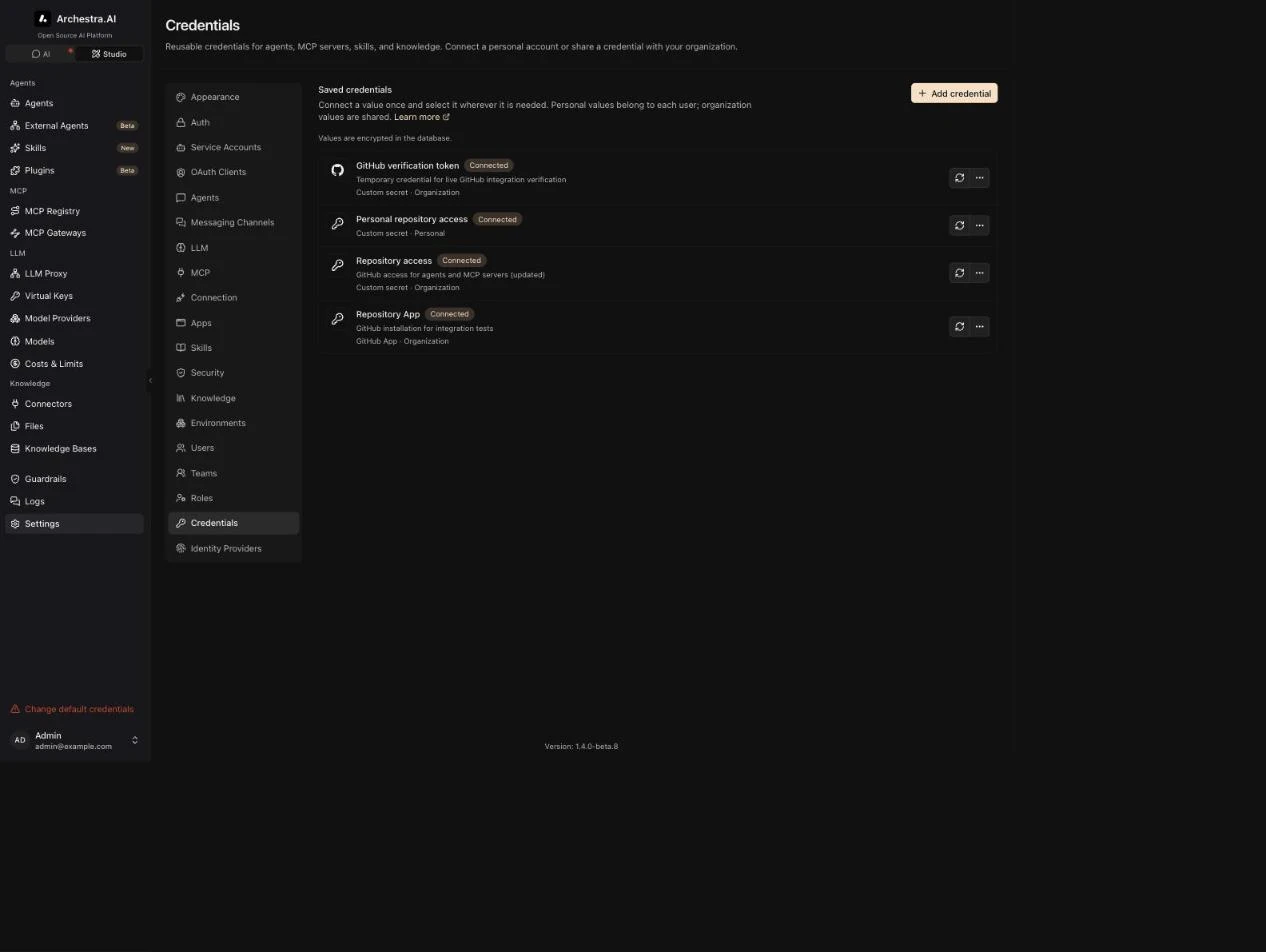
Credentials supply authentication to Agent Runtime, MCP servers, skills, plugins, and Knowledge connectors. Manage them under Settings → Credentials. Credentials are available without enabling Agent Runtime.
Credential Types
A Custom secret holds one value, such as a GitHub personal access token. The integration determines how that value is used.
A GitHub App always belongs to the organization. It holds an API URL, app ID, installation ID, and private key. Archestra uses the private key to request an installation token. Agent and MCP environments receive the token, never the private key.
Installation tokens expire after one hour. Archestra renews them for managed runtimes. See Token Refresh for process behavior.
Install the GitHub App on the repositories it needs. Its installation permissions determine the token's access. Individual integrations describe their required permissions.
A GitHub user connection links your account to an organization-managed App. Authorize once through GitHub. Every harness using that credential acts as your GitHub user. Access is limited to permissions held by both you and the App.
The organization App needs an OAuth client ID and client secret for personal authorization. Register <frontend URL>/settings/credentials/github/callback as its callback URL. Keep expiring user authorization tokens enabled. Personal authorization requires writable secret storage.
User connections and bot installation credentials have separate ownership policies. Interactive coding agents can use personal connections. Unattended agents can use the organization's installation credential.
Ownership
Every credential definition has a name, description, type, and owner policy. Its saved values are separate from that definition.
Each user means every person connects their own private value. Agent Runtime uses the person acting on the run. MCP servers use the owner of a personal installation. Another user's value is never substituted.
The organization means an administrator connects one shared value. Scheduled skill, plugin, and Knowledge syncs use organization credentials.
Create separate definitions when the same service needs both ownership policies. A personal MCP credential cannot be used by an organization installation.
Storage
Connect both personal and organization values from Settings → Credentials. Settings → Secrets configures the storage provider.
Saved values use the configured secrets manager. Archestra stores them in its database or Vault. Read-only Vault deployments store references to existing secret fields.
Select the Vault path and key when connecting a value. The same reference works wherever the credential is selected. Integrations read values through the secrets manager at execution time.
The Credentials page shows connection status without revealing saved values. LLM provider accounts and native Claude subscriptions retain their dedicated sign-in flows.
Using Credentials
Agent Runtime and MCP environment editors share the same Secret source selector. Choose a saved credential and enter the variable name expected by the runtime. One credential can supply GITHUB_TOKEN in one resource and GH_TOKEN in another.
A resource-specific secret supplies only that resource. Use a saved credential when several resources need the same value.
Conversation setup links check all required credentials after GitHub authorization. Complete any remaining credentials, then send your message again in the original conversation. Connecting credentials does not automatically retry the request.
GitHub skill and plugin imports accept saved secrets as tokens or saved GitHub Apps. GitHub Knowledge connectors select an organization credential. See Skills, Plugins, and Knowledge for repository setup.
Rotation And Disconnection
Replacing a value updates future resolutions wherever the credential is referenced. For static secrets, restart MCP processes or start a new Agent Runtime run.
Skill and Knowledge operations resolve GitHub App tokens when they authenticate. Managed runtime tokens also renew during execution. Personal GitHub connections refresh automatically while their authorization remains valid. Expired or revoked authorization requires reconnecting through GitHub.
Disconnecting removes a saved value without removing its definition. Required bindings need a connected value before execution. Deleting a definition is blocked while a resource references it.
Token Refresh
MCP servers receive renewed tokens through a managed process restart. Existing calls finish before renewal. New calls receive a retry response while the server drains and reconnects. Shared installations renew their common process together. Failed tool calls are never replayed automatically.
Agent Runtime keeps its running process and workspace. The built-in Agent reads renewed values before each shell command. Maintained images refresh GitHub authentication for each gh invocation, including Git credential-helper requests.
Custom runtime code reads the file named by ARCHESTRA_AGENT_RUNTIME_CREDENTIALS_FILE. It contains a taskId and a credentials object keyed by environment-variable name. Each entry has a value and expiresAt, expressed in Unix milliseconds. Read the file again before authenticating, and reject expired values. Kubernetes updates this file without restarting the process.
Environment variables remain startup snapshots. A custom process that caches one token still loses access when it expires. This also applies to commands that outlive a token and keep reusing it. Start a new command or make the client reread the managed file.
Provider failures delay renewal. Tokens keep their original expiry. MCP calls fail until renewal succeeds. Managed Agent commands refuse expired or unavailable credentials. Retained interactive sessions keep renewing until workspace cleanup. Disconnecting the credential or canceling the run prevents further renewal.
Use Case: One GitHub Credential Across Integrations
Save a GitHub token as an organization Custom secret named Repository access. Connect its value once.
Select Repository access for a coding Agent's GITHUB_TOKEN environment variable. Select it again for a GitHub MCP server's GITHUB_PERSONAL_ACCESS_TOKEN variable. Use the same credential for private skill imports or a GitHub Knowledge connector.
For personal repository access, create a GitHub user connection referencing the organization App. Each person authorizes GitHub once. Select that connection for each coding harness and personal MCP installation.
A GitHub App follows the same reuse pattern. Save its installation details, connect the private key, and select the credential in each integration.
Upgrading
Existing GitHub tokens become custom secrets. GitHub App configurations and runtime connections move into the shared credential store. Existing secret references and skill or plugin links are preserved.
This migration requires a coordinated upgrade. Stop older application replicas before applying it. Start the updated replicas after the migration completes.